> ## Documentation Index
> Fetch the complete documentation index at: https://docs.incredibuild.com/llms.txt
> Use this file to discover all available pages before exploring further.
# Obtaining AWS Login Details
To enable cloud with AWS, you need to provide several login details during the activation of Incredibuild Cloud.
* **Role ARN** – the Role Amazon Resource Name (ARN) that is generated automatically upon the creation of the new role. For more information on Amazon Resource Names (ARNs), see the [AWS documentation](https://docs.aws.amazon.com/general/latest/gr/aws-arns-and-namespaces.html).
* **External ID** – the External ID you will enter as a condition into the **Trust Relationships** settings of the new role. For more information on External IDs, see the [AWS documentation](https://docs.aws.amazon.com/IAM/latest/UserGuide/id_roles_create_for-user_externalid.html).
To generate these login details, you need to perform the following procedures:
**Note:** The procedures require an IAM user who has an **Administrator Access** policy and a **Programmatic Access** type. These procedures were verified in November 2021, but the AWS application may have changed since then.
## Creating a Custom AWS Policy
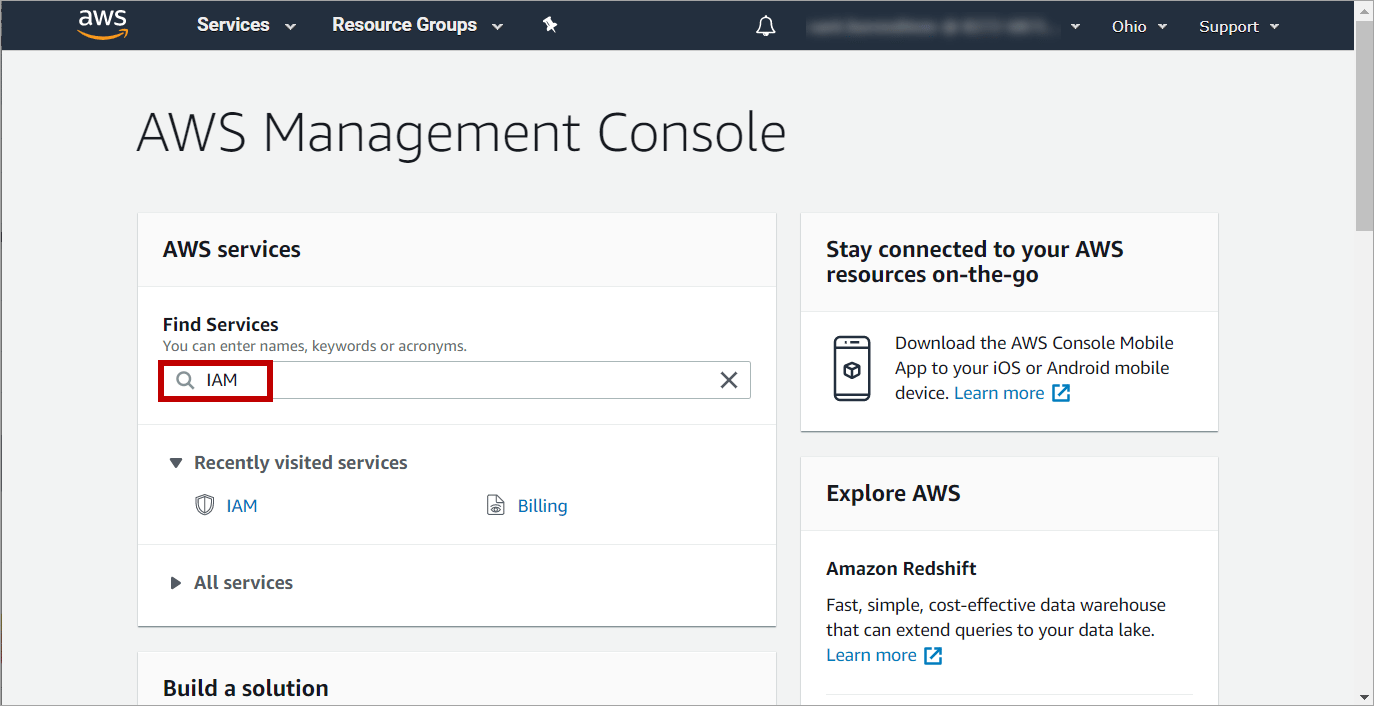
1. On AWS Management Console, enter in the **Find Services** box: **IAM**:
 2. On the **IAM** page, click the **Policies** option:
 3. On the **Policies** page, click the **Create policy** button:
 4. On the first **Create policy** page, click the **JSON** tab.
5. Enter the following code depending on your environment.
* If you want to attach a custom role to your cloud VMs, use the Custom VM Role options below and specify the role you created in AWS. You also need to specify the role in the [Cloud Settings](/cloud/settings).
* In the private policy, you must replace some of the code with your account details.
* If you are not sure which one to use, you should use the policy for public networks with the custom VM role.
* If you are planning to use [Private Link](/cloud/network-requirements), add the **ec2:DescribeVpcEndpoints** permission as well.
```text theme={null}
{
"Version": "2012-10-17",
"Statement": [
{
"Sid": "VisualEditor0",
"Effect": "Allow",
"Action": [
"servicequotas:ListServices",
"ec2:AuthorizeSecurityGroupIngress",
"ec2:DeleteSubnet",
"ec2:DescribeInstances",
"ec2:RequestSpotInstances",
"ec2:CreateVpc",
"ec2:RequestSpotFleet",
"ec2:AttachInternetGateway",
"ec2:DescribeSpotInstanceRequests",
"servicequotas:GetServiceQuota",
"ec2:ModifySubnetAttribute",
"ec2:DescribeInternetGateways",
"ec2:ModifySpotFleetRequest",
"ec2:DescribeNetworkInterfaces",
"ec2:StartInstances",
"ec2:CreateRoute",
"ec2:CreateInternetGateway",
"ec2:CreateSecurityGroup",
"ec2:DeleteInternetGateway",
"ec2:ModifyInstanceAttribute",
"ec2:DescribeRouteTables",
"servicequotas:ListServiceQuotas",
"ec2:DescribeCapacityReservations",
"ec2:TerminateInstances",
"ec2:DescribeLaunchTemplates",
"ec2:ModifyLaunchTemplate",
"ec2:DescribeLaunchTemplateVersions",
"ec2:DeleteLaunchTemplateVersions",
"ec2:CreateTags",
"ec2:RunInstances",
"ec2:CreateFleet",
"ec2:DetachInternetGateway",
"ec2:StopInstances",
"ec2:DescribeSecurityGroups",
"ec2:CreateLaunchTemplateVersion",
"ec2:RevokeSecurityGroupIngress",
"ec2:DescribeImages",
"ec2:CancelSpotInstanceRequests",
"ec2:CreateLaunchTemplate",
"ec2:DescribeSecurityGroupRules",
"ec2:DescribeVpcs",
"ec2:DeleteSecurityGroup",
"ec2:DeleteVpc",
"ec2:CreateSubnet",
"ec2:DescribeSubnets",
"ec2:DescribeAvailabilityZones",
"ec2:DescribeInstanceTypeOfferings"
],
"Resource": "*"
},
{
"Effect": "Allow",
"Action": "iam:CreateServiceLinkedRole",
"Resource": "arn:aws:iam::*:role/aws-service-role/spot.amazonaws.com/*",
"Condition": {
"StringLike": {
"iam:AWSServiceName": "spot.amazonaws.com"
}
}
},
{
"Sid": "VisualEditor1",
"Effect": "Allow",
"Action": "iam:CreateServiceLinkedRole",
"Resource": "arn:aws:iam::*:role/aws-service-role/ec2fleet.amazonaws.com/*",
"Condition": {
"StringLike": {
"iam:AWSServiceName": "ec2fleet.amazonaws.com"
}
}
},
{
"Sid": "VisualEditor2",
"Effect": "Allow",
"Action": [
"iam:AttachRolePolicy",
"iam:PutRolePolicy"
],
"Resource": "arn:aws:iam::*:role/aws-service-role/ec2fleet.amazonaws.com/*"
}
]
}
```
Replace "youraccountnumber" and "vpcid" with your account information.
```text theme={null}
{
"Version": "2012-10-17",
"Statement": [
{
"Sid": "Subnets",
"Effect": "Allow",
"Action": [
"ec2:DescribeSubnets"
],
"Resource": "*"
},
{
"Sid": "Vpc",
"Effect": "Allow",
"Action": [
"ec2:DescribeInternetGateways",
"ec2:DescribeVpcs"
],
"Resource": "*"
},
{
"Sid": "Images",
"Effect": "Allow",
"Action": [
"ec2:DescribeImages"
],
"Resource": "*"
},
{
"Sid": "Tags",
"Effect": "Allow",
"Action": [
"ec2:CreateTags"
],
"Resource": "*"
},
{
"Sid": "LaunchTemplatesRead",
"Effect": "Allow",
"Action": [
"ec2:DescribeLaunchTemplates"
"ec2:DescribeLaunchTemplateVersions"
],
"Resource": "*"
},
{
"Sid": "LaunchTemplatesCreate",
"Effect": "Allow",
"Action": [
"ec2:CreateLaunchTemplate"
],
"Resource": "*"
},
{
"Sid": "LaunchTemplatesUpdate",
"Effect": "Allow",
"Action": [
"ec2:ModifyLaunchTemplate",
"ec2:CreateLaunchTemplateVersion",
"ec2:DeleteLaunchTemplateVersions
],
"Resource": "*"
},
{
"Sid": "InstancesRead",
"Effect": "Allow",
"Action": [
"ec2:DescribeCapacityReservations",
"ec2:DescribeInstances",
"ec2:DescribeSpotInstanceRequests",
"ec2:DescribeAvailabilityZones",
"ec2:DescribeInstanceTypeOfferings"
],
"Resource": "*"
},
{
"Sid": "InstancesCreate",
"Effect": "Allow",
"Action": [
"ec2:RunInstances",
"ec2:CreateFleet",
"ec2:RequestSpotFleet",
"ec2:RequestSpotInstances"
],
"Resource": "*"
},
{
"Sid": "InstancesWrite",
"Effect": "Allow",
"Action": [
"ec2:StartInstances",
"ec2:StopInstances",
"ec2:TerminateInstances",
"ec2:ModifyInstanceAttribute",
"ec2:ModifySpotFleetRequest",
"ec2:CancelSpotInstanceRequests"
],
"Resource": "*",
"Condition": {
"StringLike": {
"ec2:ResourceTag/resourceGroup": "*cloud-rg"
}
}
},
{
"Sid": "SecurityGroupsRead",
"Effect": "Allow",
"Action": [
"ec2:DescribeSecurityGroups"
],
"Resource": "*"
},
{
"Sid": "SecurityGroupCreate",
"Effect": "Allow",
"Action": [
"ec2:CreateSecurityGroup"
],
"Resource": [
"arn:aws:ec2:*::vpc/",
"arn:aws:ec2:*::security-group/*"
]
},
{
"Sid": "SecurityGroupDelete",
"Effect": "Allow",
"Action": [
"ec2:DeleteSecurityGroup"
],
"Resource": "*",
"Condition": {
"StringLike": {
"ec2:ResourceTag/resourceGroup": "*cloud-rg"
}
}
},
{
"Sid": "SecurityGroupsRulesRead",
"Effect": "Allow",
"Action": [
"ec2:DescribeSecurityGroupRules"
],
"Resource": "*"
},
{
"Sid": "SecurityGroupsRulesWrite",
"Effect": "Allow",
"Action": [
"ec2:AuthorizeSecurityGroupIngress",
"ec2:RevokeSecurityGroupIngress"
],
"Resource": "*",
"Condition": {
"StringLike": {
"ec2:ResourceTag/resourceGroup": "*cloud-rg"
}
}
},
{
"Sid": "Quotas",
"Effect": "Allow",
"Action": [
"servicequotas:ListServices",
"servicequotas:GetServiceQuota",
"servicequotas:ListServiceQuotas"
],
"Resource": "*"
},
{
"Sid": "SpotServiceLinkedRole",
"Effect": "Allow",
"Action": "iam:CreateServiceLinkedRole",
"Resource": "arn:aws:iam::*:role/aws-service-role/spot.amazonaws.com/*",
"Condition": {
"StringLike": {
"iam:AWSServiceName": "spot.amazonaws.com"
}
}
},
{
"Sid": "Ec2FleetServiceLinkedRole",
"Effect": "Allow",
"Action": "iam:CreateServiceLinkedRole",
"Resource": "arn:aws:iam::*:role/aws-service-role/ec2fleet.amazonaws.com/*",
"Condition": {
"StringLike": {
"iam:AWSServiceName": "ec2fleet.amazonaws.com"
}
}
}
]
}
```
Replace "Account-Id", "RoleName1", and "RoleName2" with the name or names of your account ID and custom VM roles. You can specify one role or as many as you want.
```text theme={null}
{
"Version": "2012-10-17",
"Statement": [
{
"Sid": "VisualEditor0",
"Effect": "Allow",
"Action": [
"servicequotas:ListServices",
"ec2:AuthorizeSecurityGroupIngress",
"ec2:DeleteSubnet",
"ec2:DescribeInstances",
"ec2:RequestSpotInstances",
"ec2:CreateVpc",
"ec2:RequestSpotFleet",
"ec2:AttachInternetGateway",
"ec2:DescribeSpotInstanceRequests",
"servicequotas:GetServiceQuota",
"ec2:ModifySubnetAttribute",
"ec2:DescribeInternetGateways",
"ec2:ModifySpotFleetRequest",
"ec2:DescribeNetworkInterfaces",
"ec2:StartInstances",
"ec2:CreateRoute",
"ec2:CreateInternetGateway",
"ec2:CreateSecurityGroup",
"ec2:DeleteInternetGateway",
"ec2:ModifyInstanceAttribute",
"ec2:DescribeRouteTables",
"servicequotas:ListServiceQuotas",
"ec2:DescribeCapacityReservations",
"ec2:TerminateInstances",
"ec2:DescribeLaunchTemplates",
"ec2:ModifyLaunchTemplate",
"ec2:DescribeLaunchTemplateVersions",
"ec2:DeleteLaunchTemplateVersions",
"ec2:CreateTags",
"ec2:RunInstances",
"ec2:CreateFleet",
"ec2:DetachInternetGateway",
"ec2:StopInstances",
"ec2:DescribeSecurityGroups",
"ec2:CreateLaunchTemplateVersion",
"ec2:RevokeSecurityGroupIngress",
"ec2:DescribeImages",
"ec2:CancelSpotInstanceRequests",
"ec2:CreateLaunchTemplate",
"ec2:DescribeSecurityGroupRules",
"ec2:DescribeVpcs",
"ec2:DeleteSecurityGroup",
"ec2:DeleteVpc",
"ec2:CreateSubnet",
"ec2:DescribeIamInstanceProfileAssociations",
"ec2:DescribeSubnets",
"ec2:DescribeAvailabilityZones",
"ec2:DescribeInstanceTypeOfferings"
],
"Resource": "*"
},
{
"Effect": "Allow",
"Action": "iam:CreateServiceLinkedRole",
"Resource": "arn:aws:iam::*:role/aws-service-role/spot.amazonaws.com/*",
"Condition": {
"StringLike": {
"iam:AWSServiceName": "spot.amazonaws.com"
}
}
},
{
"Sid": "VisualEditor1",
"Effect": "Allow",
"Action": "iam:CreateServiceLinkedRole",
"Resource": "arn:aws:iam::*:role/aws-service-role/ec2fleet.amazonaws.com/*",
"Condition": {
"StringLike": {
"iam:AWSServiceName": "ec2fleet.amazonaws.com"
}
}
},
{
"Sid": "VisualEditor2",
"Effect": "Allow",
"Action": [
"iam:AttachRolePolicy",
"iam:PutRolePolicy"
],
"Resource": "arn:aws:iam::*:role/aws-service-role/ec2fleet.amazonaws.com/*"
},
{
"Sid": "VisualEditor3",
"Effect": "Allow",
"Action": [
"iam:GetRole",
"iam:PassRole"
],
"Resource": [
"arn:aws:iam:::role/",
"arn:aws:iam:::role/"
]
},
{
"Sid": "VisualEditor4",
"Effect": "Allow",
"Action": [
"ec2:DisassociateIamInstanceProfile",
"ec2:AssociateIamInstanceProfile"
],
"Resource": "",
"Condition": {
"StringEquals": {
"ec2:ResourceTag/incredibuild": "1"
}
}
}
]
}
```
Replace "youraccountnumber" and "vpcid" with your account information.
Replace "Account-Id", "RoleName1", and "RoleName2" with the name or names of your account ID and custom VM roles. You can specify one role or as many as you want.
```text theme={null}
{
"Version": "2012-10-17",
"Statement": [
{LaunchTemplatesRead
"Sid": "Subnets",
"Effect": "Allow",
"Action": [
"ec2:DescribeSubnets"
],
"Resource": "*"
},
{
"Sid": "Vpc",
"Effect": "Allow",
"Action": [
"ec2:DescribeInternetGateways",
"ec2:DescribeVpcs"
],
"Resource": "*"
},
{
"Sid": "Images",
"Effect": "Allow",
"Action": [
"ec2:DescribeImages"
],
"Resource": "*"
},
{
"Sid": "Tags",
"Effect": "Allow",
"Action": [
"ec2:CreateTags"
],
"Resource": "*"
},
{
"Sid": "LaunchTemplatesRead",
"Effect": "Allow",
"Action": [
"ec2:DescribeLaunchTemplates"
"ec2:DescribeLaunchTemplateVersions"
],
"Resource": "*"
},
{
"Sid": "LaunchTemplatesCreate",
"Effect": "Allow",
"Action": [
"ec2:CreateLaunchTemplate"
],
"Resource": "*"
},
{
"Sid": "LaunchTemplatesUpdate",
"Effect": "Allow",
"Action": [
"ec2:ModifyLaunchTemplate",
"ec2:CreateLaunchTemplateVersion",
"ec2:DeleteLaunchTemplateVersions"
],
"Resource": "*"
},
{
"Sid": "InstancesRead",
"Effect": "Allow",
"Action": [
"ec2:DescribeCapacityReservations",
"ec2:DescribeInstances",
"ec2:DescribeSpotInstanceRequests",
"ec2:DescribeAvailabilityZones",
"ec2:DescribeInstanceTypeOfferings"
],
"Resource": "*"
},
{
"Sid": "InstancesCreate",
"Effect": "Allow",
"Action": [
"ec2:RunInstances",
"ec2:CreateFleet",
"ec2:RequestSpotFleet",
"ec2:RequestSpotInstances"
],
"Resource": "*"
},
{
"Sid": "InstancesWrite",
"Effect": "Allow",
"Action": [
"ec2:StartInstances",
"ec2:StopInstances",
"ec2:TerminateInstances",
"ec2:ModifyInstanceAttribute",
"ec2:ModifySpotFleetRequest",
"ec2:CancelSpotInstanceRequests"
],
"Resource": "*",
"Condition": {
"StringLike": {
"ec2:ResourceTag/resourceGroup": "*cloud-rg"
}
}
},
{
"Sid": "SecurityGroupsRead",
"Effect": "Allow",
"Action": [
"ec2:DescribeSecurityGroups"
],
"Resource": "*"
},
{
"Sid": "SecurityGroupCreate",
"Effect": "Allow",
"Action": [
"ec2:CreateSecurityGroup"
],
"Resource": [
"arn:aws:ec2:*::vpc/",
"arn:aws:ec2:*::security-group/*"
]
},
{
"Sid": "SecurityGroupDelete",
"Effect": "Allow",
"Action": [
"ec2:DeleteSecurityGroup"
],
"Resource": "*",
"Condition": {
"StringLike": {
"ec2:ResourceTag/resourceGroup": "*cloud-rg"
}
}
},
{
"Sid": "SecurityGroupsRulesRead",
"Effect": "Allow",
"Action": [
"ec2:DescribeSecurityGroupRules"
],
"Resource": "*"
},
{
"Sid": "SecurityGroupsRulesWrite",
"Effect": "Allow",
"Action": [
"ec2:AuthorizeSecurityGroupIngress",
"ec2:RevokeSecurityGroupIngress"
],
"Resource": "*",
"Condition": {
"StringLike": {
"ec2:ResourceTag/resourceGroup": "*cloud-rg"
}
}
},
{
"Sid": "Quotas",
"Effect": "Allow",
"Action": [
"servicequotas:ListServices",
"servicequotas:GetServiceQuota",
"servicequotas:ListServiceQuotas"
],
"Resource": "*"
},
{
"Sid": "SpotServiceLinkedRole",
"Effect": "Allow",
"Action": "iam:CreateServiceLinkedRole",
"Resource": "arn:aws:iam::*:role/aws-service-role/spot.amazonaws.com/*",
"Condition": {
"StringLike": {
"iam:AWSServiceName": "spot.amazonaws.com"
}
}
},
{
"Sid": "Ec2FleetServiceLinkedRole",
"Effect": "Allow",
"Action": "iam:CreateServiceLinkedRole",
"Resource": "arn:aws:iam::*:role/aws-service-role/ec2fleet.amazonaws.com/*",
"Condition": {
"StringLike": {
"iam:AWSServiceName": "ec2fleet.amazonaws.com"
}
}
},
{
"Sid": "GetAndPassRole",
"Effect": "Allow",
"Action": [
"iam:GetRole",
"iam:PassRole"
],
"Resource": [
"arn:aws:iam:::role/",
"arn:aws:iam:::role/"
]
},
{
"Sid": "AssociateAndDisassociateIamProfile",
"Effect": "Allow",
"Action": [
"ec2:DisassociateIamInstanceProfile",
"ec2:AssociateIamInstanceProfile"
],
"Resource": "",
"Condition": {
"StringEquals": {
"ec2:ResourceTag/incredibuild": "1"
}
}
},
{
"Sid": "IamInstanceProfileRulesRead",
"Effect": "Allow",
"Action": [
"ec2:DescribeIamInstanceProfileAssociations"
],
"Resource": "*"
}
]
}
```
6. Complete the policy by defining a **name** and clicking **Create Policy**. You will need the name in later steps.
## Create a Custom AWS Role
1. Go to **Roles** > **Create Role**.
4. On the first **Create policy** page, click the **JSON** tab.
5. Enter the following code depending on your environment.
* If you want to attach a custom role to your cloud VMs, use the Custom VM Role options below and specify the role you created in AWS. You also need to specify the role in the [Cloud Settings](/cloud/settings).
* In the private policy, you must replace some of the code with your account details.
* If you are not sure which one to use, you should use the policy for public networks with the custom VM role.
* If you are planning to use [Private Link](/cloud/network-requirements), add the **ec2:DescribeVpcEndpoints** permission as well.
```text theme={null}
{
"Version": "2012-10-17",
"Statement": [
{
"Sid": "VisualEditor0",
"Effect": "Allow",
"Action": [
"servicequotas:ListServices",
"ec2:AuthorizeSecurityGroupIngress",
"ec2:DeleteSubnet",
"ec2:DescribeInstances",
"ec2:RequestSpotInstances",
"ec2:CreateVpc",
"ec2:RequestSpotFleet",
"ec2:AttachInternetGateway",
"ec2:DescribeSpotInstanceRequests",
"servicequotas:GetServiceQuota",
"ec2:ModifySubnetAttribute",
"ec2:DescribeInternetGateways",
"ec2:ModifySpotFleetRequest",
"ec2:DescribeNetworkInterfaces",
"ec2:StartInstances",
"ec2:CreateRoute",
"ec2:CreateInternetGateway",
"ec2:CreateSecurityGroup",
"ec2:DeleteInternetGateway",
"ec2:ModifyInstanceAttribute",
"ec2:DescribeRouteTables",
"servicequotas:ListServiceQuotas",
"ec2:DescribeCapacityReservations",
"ec2:TerminateInstances",
"ec2:DescribeLaunchTemplates",
"ec2:ModifyLaunchTemplate",
"ec2:DescribeLaunchTemplateVersions",
"ec2:DeleteLaunchTemplateVersions",
"ec2:CreateTags",
"ec2:RunInstances",
"ec2:CreateFleet",
"ec2:DetachInternetGateway",
"ec2:StopInstances",
"ec2:DescribeSecurityGroups",
"ec2:CreateLaunchTemplateVersion",
"ec2:RevokeSecurityGroupIngress",
"ec2:DescribeImages",
"ec2:CancelSpotInstanceRequests",
"ec2:CreateLaunchTemplate",
"ec2:DescribeSecurityGroupRules",
"ec2:DescribeVpcs",
"ec2:DeleteSecurityGroup",
"ec2:DeleteVpc",
"ec2:CreateSubnet",
"ec2:DescribeSubnets",
"ec2:DescribeAvailabilityZones",
"ec2:DescribeInstanceTypeOfferings"
],
"Resource": "*"
},
{
"Effect": "Allow",
"Action": "iam:CreateServiceLinkedRole",
"Resource": "arn:aws:iam::*:role/aws-service-role/spot.amazonaws.com/*",
"Condition": {
"StringLike": {
"iam:AWSServiceName": "spot.amazonaws.com"
}
}
},
{
"Sid": "VisualEditor1",
"Effect": "Allow",
"Action": "iam:CreateServiceLinkedRole",
"Resource": "arn:aws:iam::*:role/aws-service-role/ec2fleet.amazonaws.com/*",
"Condition": {
"StringLike": {
"iam:AWSServiceName": "ec2fleet.amazonaws.com"
}
}
},
{
"Sid": "VisualEditor2",
"Effect": "Allow",
"Action": [
"iam:AttachRolePolicy",
"iam:PutRolePolicy"
],
"Resource": "arn:aws:iam::*:role/aws-service-role/ec2fleet.amazonaws.com/*"
}
]
}
```
Replace "youraccountnumber" and "vpcid" with your account information.
```text theme={null}
{
"Version": "2012-10-17",
"Statement": [
{
"Sid": "Subnets",
"Effect": "Allow",
"Action": [
"ec2:DescribeSubnets"
],
"Resource": "*"
},
{
"Sid": "Vpc",
"Effect": "Allow",
"Action": [
"ec2:DescribeInternetGateways",
"ec2:DescribeVpcs"
],
"Resource": "*"
},
{
"Sid": "Images",
"Effect": "Allow",
"Action": [
"ec2:DescribeImages"
],
"Resource": "*"
},
{
"Sid": "Tags",
"Effect": "Allow",
"Action": [
"ec2:CreateTags"
],
"Resource": "*"
},
{
"Sid": "LaunchTemplatesRead",
"Effect": "Allow",
"Action": [
"ec2:DescribeLaunchTemplates"
"ec2:DescribeLaunchTemplateVersions"
],
"Resource": "*"
},
{
"Sid": "LaunchTemplatesCreate",
"Effect": "Allow",
"Action": [
"ec2:CreateLaunchTemplate"
],
"Resource": "*"
},
{
"Sid": "LaunchTemplatesUpdate",
"Effect": "Allow",
"Action": [
"ec2:ModifyLaunchTemplate",
"ec2:CreateLaunchTemplateVersion",
"ec2:DeleteLaunchTemplateVersions
],
"Resource": "*"
},
{
"Sid": "InstancesRead",
"Effect": "Allow",
"Action": [
"ec2:DescribeCapacityReservations",
"ec2:DescribeInstances",
"ec2:DescribeSpotInstanceRequests",
"ec2:DescribeAvailabilityZones",
"ec2:DescribeInstanceTypeOfferings"
],
"Resource": "*"
},
{
"Sid": "InstancesCreate",
"Effect": "Allow",
"Action": [
"ec2:RunInstances",
"ec2:CreateFleet",
"ec2:RequestSpotFleet",
"ec2:RequestSpotInstances"
],
"Resource": "*"
},
{
"Sid": "InstancesWrite",
"Effect": "Allow",
"Action": [
"ec2:StartInstances",
"ec2:StopInstances",
"ec2:TerminateInstances",
"ec2:ModifyInstanceAttribute",
"ec2:ModifySpotFleetRequest",
"ec2:CancelSpotInstanceRequests"
],
"Resource": "*",
"Condition": {
"StringLike": {
"ec2:ResourceTag/resourceGroup": "*cloud-rg"
}
}
},
{
"Sid": "SecurityGroupsRead",
"Effect": "Allow",
"Action": [
"ec2:DescribeSecurityGroups"
],
"Resource": "*"
},
{
"Sid": "SecurityGroupCreate",
"Effect": "Allow",
"Action": [
"ec2:CreateSecurityGroup"
],
"Resource": [
"arn:aws:ec2:*::vpc/",
"arn:aws:ec2:*::security-group/*"
]
},
{
"Sid": "SecurityGroupDelete",
"Effect": "Allow",
"Action": [
"ec2:DeleteSecurityGroup"
],
"Resource": "*",
"Condition": {
"StringLike": {
"ec2:ResourceTag/resourceGroup": "*cloud-rg"
}
}
},
{
"Sid": "SecurityGroupsRulesRead",
"Effect": "Allow",
"Action": [
"ec2:DescribeSecurityGroupRules"
],
"Resource": "*"
},
{
"Sid": "SecurityGroupsRulesWrite",
"Effect": "Allow",
"Action": [
"ec2:AuthorizeSecurityGroupIngress",
"ec2:RevokeSecurityGroupIngress"
],
"Resource": "*",
"Condition": {
"StringLike": {
"ec2:ResourceTag/resourceGroup": "*cloud-rg"
}
}
},
{
"Sid": "Quotas",
"Effect": "Allow",
"Action": [
"servicequotas:ListServices",
"servicequotas:GetServiceQuota",
"servicequotas:ListServiceQuotas"
],
"Resource": "*"
},
{
"Sid": "SpotServiceLinkedRole",
"Effect": "Allow",
"Action": "iam:CreateServiceLinkedRole",
"Resource": "arn:aws:iam::*:role/aws-service-role/spot.amazonaws.com/*",
"Condition": {
"StringLike": {
"iam:AWSServiceName": "spot.amazonaws.com"
}
}
},
{
"Sid": "Ec2FleetServiceLinkedRole",
"Effect": "Allow",
"Action": "iam:CreateServiceLinkedRole",
"Resource": "arn:aws:iam::*:role/aws-service-role/ec2fleet.amazonaws.com/*",
"Condition": {
"StringLike": {
"iam:AWSServiceName": "ec2fleet.amazonaws.com"
}
}
}
]
}
```
Replace "Account-Id", "RoleName1", and "RoleName2" with the name or names of your account ID and custom VM roles. You can specify one role or as many as you want.
```text theme={null}
{
"Version": "2012-10-17",
"Statement": [
{
"Sid": "VisualEditor0",
"Effect": "Allow",
"Action": [
"servicequotas:ListServices",
"ec2:AuthorizeSecurityGroupIngress",
"ec2:DeleteSubnet",
"ec2:DescribeInstances",
"ec2:RequestSpotInstances",
"ec2:CreateVpc",
"ec2:RequestSpotFleet",
"ec2:AttachInternetGateway",
"ec2:DescribeSpotInstanceRequests",
"servicequotas:GetServiceQuota",
"ec2:ModifySubnetAttribute",
"ec2:DescribeInternetGateways",
"ec2:ModifySpotFleetRequest",
"ec2:DescribeNetworkInterfaces",
"ec2:StartInstances",
"ec2:CreateRoute",
"ec2:CreateInternetGateway",
"ec2:CreateSecurityGroup",
"ec2:DeleteInternetGateway",
"ec2:ModifyInstanceAttribute",
"ec2:DescribeRouteTables",
"servicequotas:ListServiceQuotas",
"ec2:DescribeCapacityReservations",
"ec2:TerminateInstances",
"ec2:DescribeLaunchTemplates",
"ec2:ModifyLaunchTemplate",
"ec2:DescribeLaunchTemplateVersions",
"ec2:DeleteLaunchTemplateVersions",
"ec2:CreateTags",
"ec2:RunInstances",
"ec2:CreateFleet",
"ec2:DetachInternetGateway",
"ec2:StopInstances",
"ec2:DescribeSecurityGroups",
"ec2:CreateLaunchTemplateVersion",
"ec2:RevokeSecurityGroupIngress",
"ec2:DescribeImages",
"ec2:CancelSpotInstanceRequests",
"ec2:CreateLaunchTemplate",
"ec2:DescribeSecurityGroupRules",
"ec2:DescribeVpcs",
"ec2:DeleteSecurityGroup",
"ec2:DeleteVpc",
"ec2:CreateSubnet",
"ec2:DescribeIamInstanceProfileAssociations",
"ec2:DescribeSubnets",
"ec2:DescribeAvailabilityZones",
"ec2:DescribeInstanceTypeOfferings"
],
"Resource": "*"
},
{
"Effect": "Allow",
"Action": "iam:CreateServiceLinkedRole",
"Resource": "arn:aws:iam::*:role/aws-service-role/spot.amazonaws.com/*",
"Condition": {
"StringLike": {
"iam:AWSServiceName": "spot.amazonaws.com"
}
}
},
{
"Sid": "VisualEditor1",
"Effect": "Allow",
"Action": "iam:CreateServiceLinkedRole",
"Resource": "arn:aws:iam::*:role/aws-service-role/ec2fleet.amazonaws.com/*",
"Condition": {
"StringLike": {
"iam:AWSServiceName": "ec2fleet.amazonaws.com"
}
}
},
{
"Sid": "VisualEditor2",
"Effect": "Allow",
"Action": [
"iam:AttachRolePolicy",
"iam:PutRolePolicy"
],
"Resource": "arn:aws:iam::*:role/aws-service-role/ec2fleet.amazonaws.com/*"
},
{
"Sid": "VisualEditor3",
"Effect": "Allow",
"Action": [
"iam:GetRole",
"iam:PassRole"
],
"Resource": [
"arn:aws:iam:::role/",
"arn:aws:iam:::role/"
]
},
{
"Sid": "VisualEditor4",
"Effect": "Allow",
"Action": [
"ec2:DisassociateIamInstanceProfile",
"ec2:AssociateIamInstanceProfile"
],
"Resource": "",
"Condition": {
"StringEquals": {
"ec2:ResourceTag/incredibuild": "1"
}
}
}
]
}
```
Replace "youraccountnumber" and "vpcid" with your account information.
Replace "Account-Id", "RoleName1", and "RoleName2" with the name or names of your account ID and custom VM roles. You can specify one role or as many as you want.
```text theme={null}
{
"Version": "2012-10-17",
"Statement": [
{LaunchTemplatesRead
"Sid": "Subnets",
"Effect": "Allow",
"Action": [
"ec2:DescribeSubnets"
],
"Resource": "*"
},
{
"Sid": "Vpc",
"Effect": "Allow",
"Action": [
"ec2:DescribeInternetGateways",
"ec2:DescribeVpcs"
],
"Resource": "*"
},
{
"Sid": "Images",
"Effect": "Allow",
"Action": [
"ec2:DescribeImages"
],
"Resource": "*"
},
{
"Sid": "Tags",
"Effect": "Allow",
"Action": [
"ec2:CreateTags"
],
"Resource": "*"
},
{
"Sid": "LaunchTemplatesRead",
"Effect": "Allow",
"Action": [
"ec2:DescribeLaunchTemplates"
"ec2:DescribeLaunchTemplateVersions"
],
"Resource": "*"
},
{
"Sid": "LaunchTemplatesCreate",
"Effect": "Allow",
"Action": [
"ec2:CreateLaunchTemplate"
],
"Resource": "*"
},
{
"Sid": "LaunchTemplatesUpdate",
"Effect": "Allow",
"Action": [
"ec2:ModifyLaunchTemplate",
"ec2:CreateLaunchTemplateVersion",
"ec2:DeleteLaunchTemplateVersions"
],
"Resource": "*"
},
{
"Sid": "InstancesRead",
"Effect": "Allow",
"Action": [
"ec2:DescribeCapacityReservations",
"ec2:DescribeInstances",
"ec2:DescribeSpotInstanceRequests",
"ec2:DescribeAvailabilityZones",
"ec2:DescribeInstanceTypeOfferings"
],
"Resource": "*"
},
{
"Sid": "InstancesCreate",
"Effect": "Allow",
"Action": [
"ec2:RunInstances",
"ec2:CreateFleet",
"ec2:RequestSpotFleet",
"ec2:RequestSpotInstances"
],
"Resource": "*"
},
{
"Sid": "InstancesWrite",
"Effect": "Allow",
"Action": [
"ec2:StartInstances",
"ec2:StopInstances",
"ec2:TerminateInstances",
"ec2:ModifyInstanceAttribute",
"ec2:ModifySpotFleetRequest",
"ec2:CancelSpotInstanceRequests"
],
"Resource": "*",
"Condition": {
"StringLike": {
"ec2:ResourceTag/resourceGroup": "*cloud-rg"
}
}
},
{
"Sid": "SecurityGroupsRead",
"Effect": "Allow",
"Action": [
"ec2:DescribeSecurityGroups"
],
"Resource": "*"
},
{
"Sid": "SecurityGroupCreate",
"Effect": "Allow",
"Action": [
"ec2:CreateSecurityGroup"
],
"Resource": [
"arn:aws:ec2:*::vpc/",
"arn:aws:ec2:*::security-group/*"
]
},
{
"Sid": "SecurityGroupDelete",
"Effect": "Allow",
"Action": [
"ec2:DeleteSecurityGroup"
],
"Resource": "*",
"Condition": {
"StringLike": {
"ec2:ResourceTag/resourceGroup": "*cloud-rg"
}
}
},
{
"Sid": "SecurityGroupsRulesRead",
"Effect": "Allow",
"Action": [
"ec2:DescribeSecurityGroupRules"
],
"Resource": "*"
},
{
"Sid": "SecurityGroupsRulesWrite",
"Effect": "Allow",
"Action": [
"ec2:AuthorizeSecurityGroupIngress",
"ec2:RevokeSecurityGroupIngress"
],
"Resource": "*",
"Condition": {
"StringLike": {
"ec2:ResourceTag/resourceGroup": "*cloud-rg"
}
}
},
{
"Sid": "Quotas",
"Effect": "Allow",
"Action": [
"servicequotas:ListServices",
"servicequotas:GetServiceQuota",
"servicequotas:ListServiceQuotas"
],
"Resource": "*"
},
{
"Sid": "SpotServiceLinkedRole",
"Effect": "Allow",
"Action": "iam:CreateServiceLinkedRole",
"Resource": "arn:aws:iam::*:role/aws-service-role/spot.amazonaws.com/*",
"Condition": {
"StringLike": {
"iam:AWSServiceName": "spot.amazonaws.com"
}
}
},
{
"Sid": "Ec2FleetServiceLinkedRole",
"Effect": "Allow",
"Action": "iam:CreateServiceLinkedRole",
"Resource": "arn:aws:iam::*:role/aws-service-role/ec2fleet.amazonaws.com/*",
"Condition": {
"StringLike": {
"iam:AWSServiceName": "ec2fleet.amazonaws.com"
}
}
},
{
"Sid": "GetAndPassRole",
"Effect": "Allow",
"Action": [
"iam:GetRole",
"iam:PassRole"
],
"Resource": [
"arn:aws:iam:::role/",
"arn:aws:iam:::role/"
]
},
{
"Sid": "AssociateAndDisassociateIamProfile",
"Effect": "Allow",
"Action": [
"ec2:DisassociateIamInstanceProfile",
"ec2:AssociateIamInstanceProfile"
],
"Resource": "",
"Condition": {
"StringEquals": {
"ec2:ResourceTag/incredibuild": "1"
}
}
},
{
"Sid": "IamInstanceProfileRulesRead",
"Effect": "Allow",
"Action": [
"ec2:DescribeIamInstanceProfileAssociations"
],
"Resource": "*"
}
]
}
```
6. Complete the policy by defining a **name** and clicking **Create Policy**. You will need the name in later steps.
## Create a Custom AWS Role
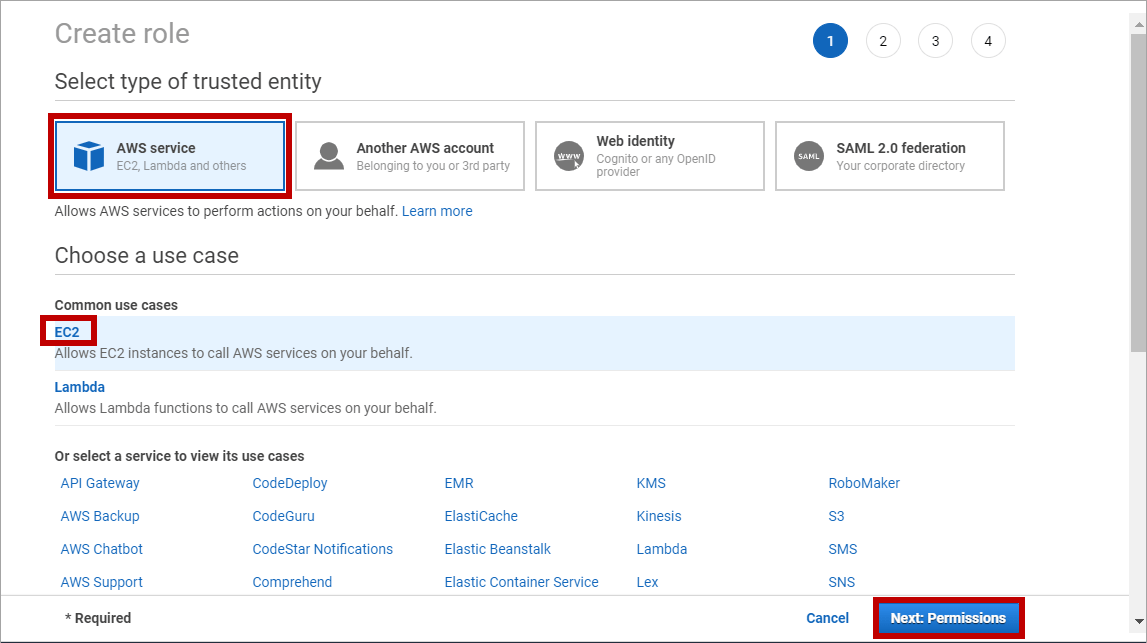
1. Go to **Roles** > **Create Role**.
 2. On the first page, select **AWS service** as the type of entity, and **EC2** as the common use case.
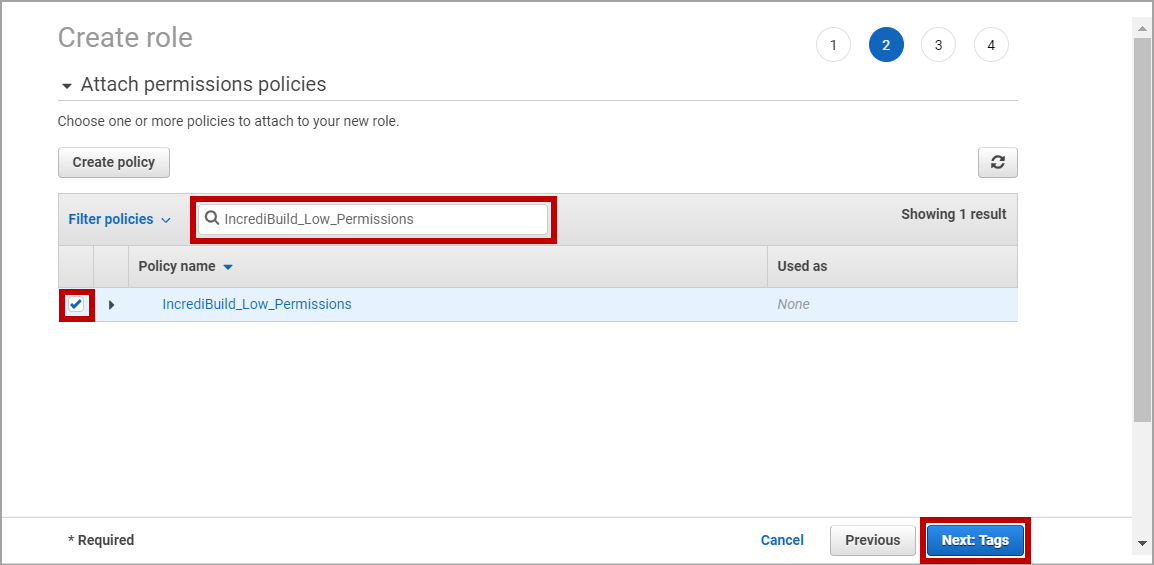
 3. On the second page, use the **Filter policies** box to find the custom policy you previously created and click its check box.
 4. \[Optional] On the third page, you can add tags to the new role you are creating.
5. On the fourth page, enter a name for the new role and click **Create role**.
4. \[Optional] On the third page, you can add tags to the new role you are creating.
5. On the fourth page, enter a name for the new role and click **Create role**.
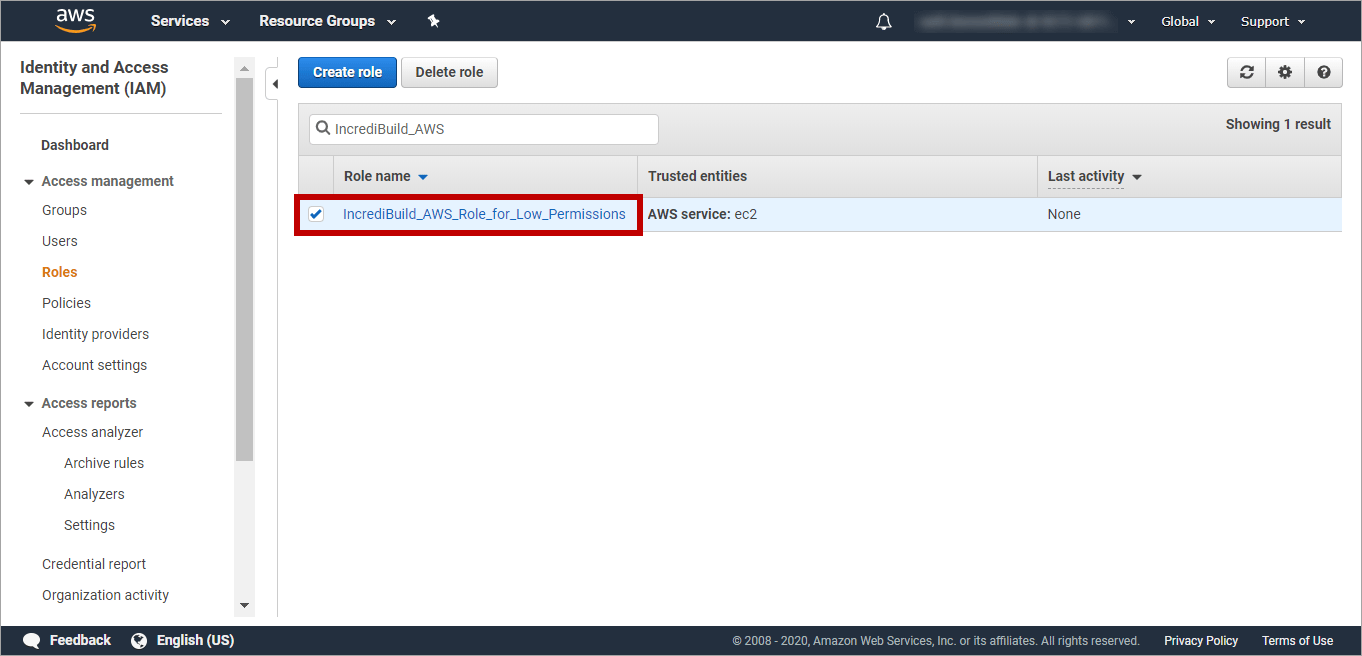
 6. On the **Roles** page, locate the newly created role. Then, select its check box and click it to open it:
 7. On the **Summary** page of the new role, click the **Trust relationships** tab. Then, click the **Edit trust relationship** button:
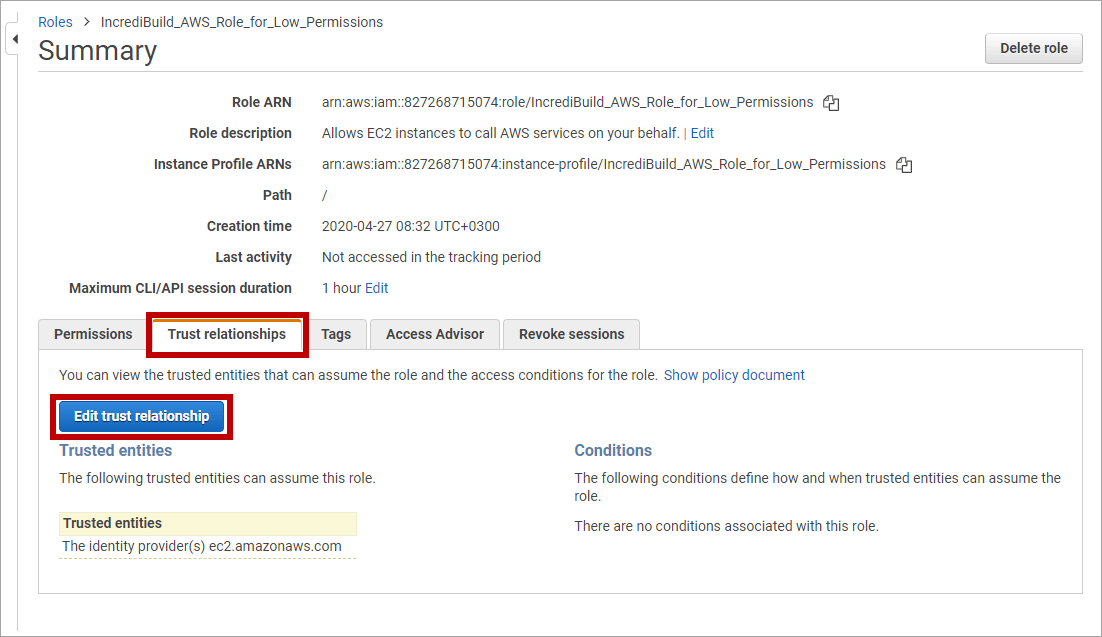 8. On the **Edit Trust Relationship** page, delete the existing content and replace it with this code:
\{
"Version": "2012-10-17",
"Statement": \[
\{
"Effect": "Allow",
"Principal": \{
"AWS": "arn:aws:iam::827268715074:user/incrediCloud" },
"Action": "sts:AssumeRole",
"Condition": \{
"StringEquals": \{
"sts:ExternalId": `""` }
}
}
]
}
Enter any unique string **without special characters** in place of "**New\_String\_for\_Your\_External\_ID**". You will need to provide it to Incredibuild during activation.
9. After you entered your unique External ID to the **Policy Document** pane, click the **Update Trust Policy** button. You return to the **Summary** page of the role you created. In this **Summary** page you can find the required login details for activating Incredibuild Cloud with lower permissions:
8. On the **Edit Trust Relationship** page, delete the existing content and replace it with this code:
\{
"Version": "2012-10-17",
"Statement": \[
\{
"Effect": "Allow",
"Principal": \{
"AWS": "arn:aws:iam::827268715074:user/incrediCloud" },
"Action": "sts:AssumeRole",
"Condition": \{
"StringEquals": \{
"sts:ExternalId": `""` }
}
}
]
}
Enter any unique string **without special characters** in place of "**New\_String\_for\_Your\_External\_ID**". You will need to provide it to Incredibuild during activation.
9. After you entered your unique External ID to the **Policy Document** pane, click the **Update Trust Policy** button. You return to the **Summary** page of the role you created. In this **Summary** page you can find the required login details for activating Incredibuild Cloud with lower permissions:
