Using Helpers with Many CPU Cores
Overview
Incredibuild for Linux supports Agents (Initiators and Helpers) with as many CPU cores as available. However, a Helper can only be assigned to a single build at any given time. This means that a build that requires X remote cores may be assigned a Helper with more than X cores: the extra cores would not be used by the build and would not be available for other builds.
Normally this is not a real problem, as the efficiency and performance gain are sufficient. But, in extreme cases such as machines with 128 cores, this might lead to core under-utilization.
There is an option to treat such machines as multiple, separate Helpers, so that each one can be assigned individually. This will increase the CPU core utilization, but might increase the network and disk overhead.
Requirements
The following procedure was tested and is supported, alterations are possible to adapt this to your environment.
The Helpers will be running as containers, on host machine installed with:
-
Ubuntu 22.04 LTS
-
Docker v28
Each Helper requires a dedicated IP address, and the procedure uses DHCP-allocated IPs.
Procedure
-
Install Podman:
sudo apt-get install docker-ce
-
Create a Dockerfile:
CopyFROM ubuntu:22.04
ARG DEBIAN_FRONTEND=noninteractive
ENV TZ=Etc/GMT
RUN apt-get update
RUN apt-get install -y curl isc-dhcp-client bzip2 iputils-ping ssh
COPY ./ib.run ./ib.run
RUN chmod a+x ./ib.run
ARG COORD
ENV COORD=$COORD
RUN ./ib.run --action install --helper enabled \
--data-dir /etc/ --coordinator-machine ${COORD} \
--skip-coordinator-test true --license-type SUVM
CMD bash -c -x "ip addr flush dev eth0 && dhclient eth0 && \
/opt/incredibuild/etc/init.d/incredibuild start && bash" -
Get the correct Incredibuild for Linux installation file that matches the version of your Coordinator (replace 4.18.1 with the version that matches your Coordinator):
Copycurl -L https://incredibuild.com/downloads/incredibuild_4.18.1.run \
-o ./ib.run -
Build the container image (replace 198.51.100.42 with the IP address or host name of your Coordinator):
docker build . -t helper --build-arg COORD=198.51.100.42
-
Create MACVLAN interface(s) and run the container(s) (replace ens192 with the Ethernet interface connected to the network, and set CONTAINERS to the number of containers you want):
CopyIFC=ens192
CONTAINERS=2
CORES_TOTAL=$(cat /proc/cpuinfo | grep "^processor" | wc -l)
CORES_PER_HELPER=$(($CORES_TOTAL/$CONTAINERS))
for ((i=0;i<$CONTAINERS;i++)); do
if [ "$(docker network ls | grep ib_macvlan_$i | wc -l)" != 1 ]; then
docker network create -d macvlan -o parent=$IFC ib_macvlan_$i
sleep 10
fi
docker run -it --detach --name helper_$i \
--hostname "$(hostname -s)-$i.$(hostname -d)" \
--network ib_macvlan_$i --cpus=$CORES_PER_HELPER \
--privileged helper
sleep 10
done -
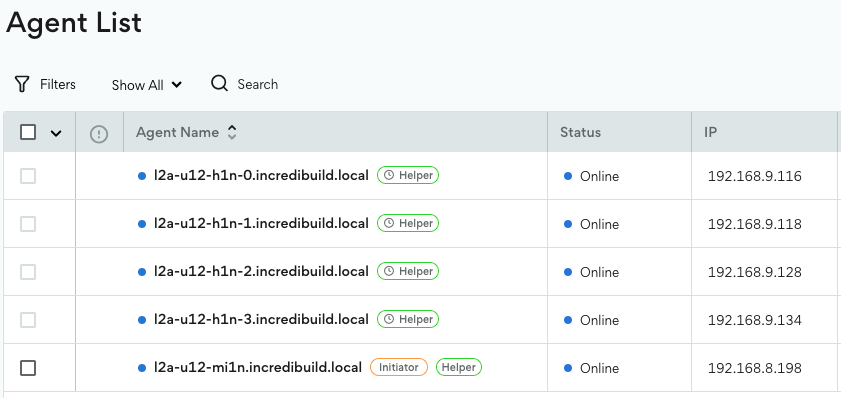
After a short while the new Helpers connect to the Coordinator. You can verify this in the Agents page: