Accelerating Android OS Project Builds
An Android OS Project (AOSP) build is a massive, heterogeneous orchestration of thousands of interdependent tasks across multiple languages and toolchains.
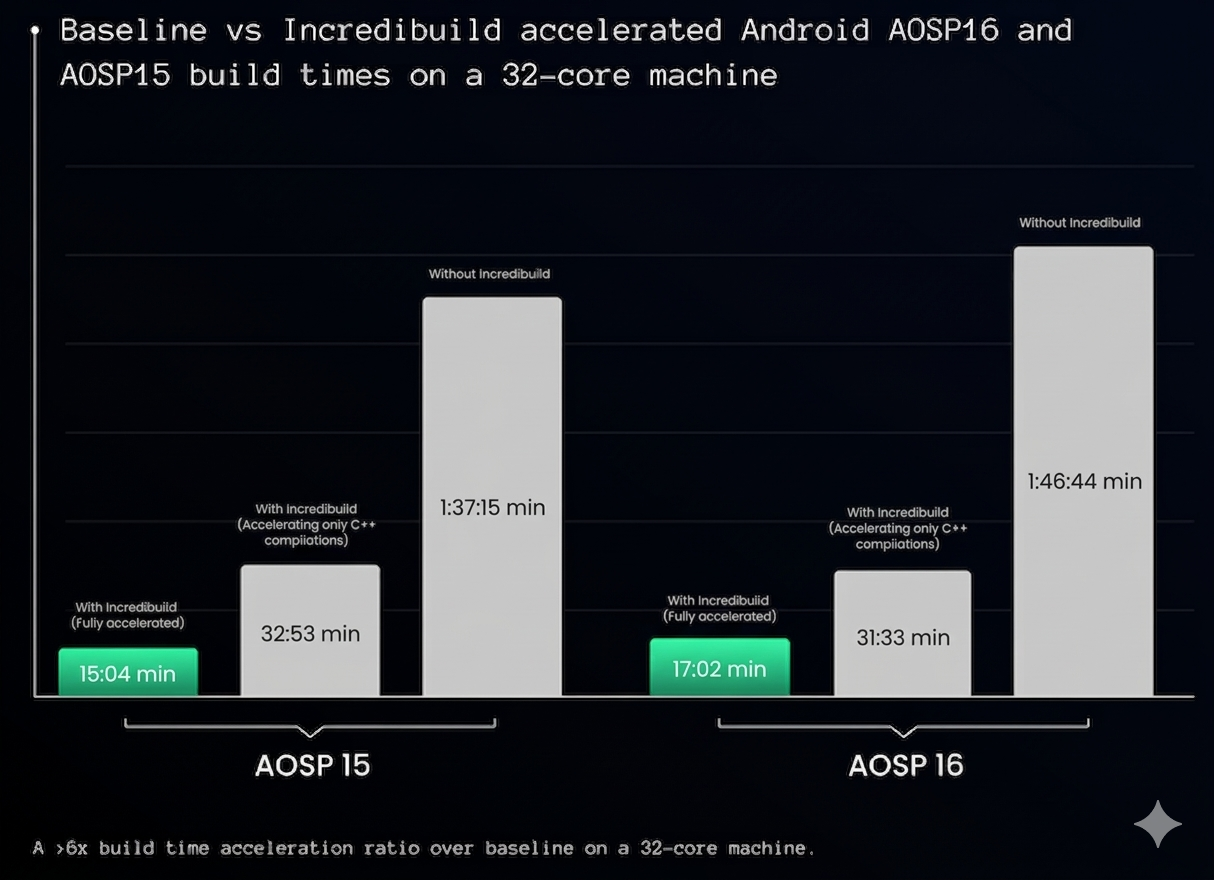
Incredibuild accelerates AOSP builds by combining Build Cache (reusing 90% of tasks) with distributed computing This reduces a typical AOSP build from nearly 2 hours to a quarter of an hour. Security is maintained as all source code remains fully resident on your local on-premises or private cloud network.
Note: Incredibuild does not require any modifications to your build scripts, ci scripts or AOSP build tools.
This enables a single build agent to process 6x as many jobs per day, significantly reducing queue times and cloud compute waste.
| Metric | AOSP 15 (Vanilla) | AOSP 16 (Vanilla) |
|---|---|---|
|
Hardware |
32-Core, 64GB RAM, NVMe |
32-Core, 64GB RAM, NVMe |
|
Baseline (Native) |
1 Hour 37 Minutes |
1 Hour 46 Minutes |
|
Incredibuild (C++ Compilation Only) |
31 Minutes |
32 Minutes |
|
Incredibuild (Fully Accelerated)* |
15 Minutes 04 Seconds |
17 Minutes 02 Seconds |
|
Acceleration Ratio |
~6.5x |
~6.2x |
*Fully Accelerated includes the Universal Shared Cache for C++, Rust, Java, Kotlin, Metalava, R8 and other AOSP tools and scripts
Incredibuild AOSP Tools
Incredibuild provides 18+ AOSP-specific tools to accelerate the entire multi-language ASOP pipeline. This includes:
C/C++ (Clang/LLVM)
-
Distribution Mode: Thousands of small compilation units are distributed across the Grid.
-
Shared Cache: Pre-compiled object files are stored in the Universal Shared Cache. If a CI runner has already compiled a specific version of libcutils, the developer’s local build will "hit" the cache and skip the compilation entirely. C++ link steps are supported in the same way.
Rust (Rustc)
-
The New Bottleneck: As AOSP moves more system services to Rust, rustc execution becomes a critical path.
-
Bulk Caching: Incredibuild caches Rust crates and dependencies, preventing the "Full Rust Rebuild" penalty often seen after small code changes.
Gradle, Java, Kotlin & R8
-
Gradle & Blueprint Support: Incredibuild accelerates the compilation of system apps and framework services.
-
R8 Shrinker: One of the most memory-intensive parts of the build. Incredibuild manages R8 execution to prevent local OOM (Out of Memory) errors by utilizing the memory-rich Helper nodes in the Grid or by cache-reuse of these tasks if unchanged.
Framework Tools (Metalava & AIDL)
-
Unblocking Serial Gates: Metalava and AIDL are often serial bottlenecks that leave CPU cores idle.
-
Logic: By caching the outputs of these tools, Incredibuild allows the build to "skip" these gates in seconds rather than minutes, unblocking the massive parallel explosion of downstream tasks.
Getting Started
Every AOSP environment is unique due to local network latency, storage performance, and custom build code. To get started:
-
Run the Incredibuild Site Survey to produce your comprehensive acceleration blueprint.
-
Review the site survey results by scheduling a 15-minute technical deep-dive with Incredibuild architects.
-
(If required) Troubleshoot AOSP acceleration.
Scheduling a Discovery Session
Schedule a discovery session with Incredibuild to establish the following:
-
Understanding Success Criteria: Identify your primary pain points—whether it’s CI pipeline congestion, developer iteration latency, or excessive cloud compute spend.
-
Defining the Baseline: Establish which AOSP version, targets, and hardware profiles will be the focus of the analysis.
-
Verifying the Prerequisites: Confirm that your environment meets the survey script requirements (e.g., Linux-based build host, standard Soong/Ninja toolchain).
Running the Incredibuild Site Survey
Incredibuild technical experts will help guide your team through executing the Incredibuild Site Survey to ensure that it targets your specific, real-world build challenges.
Note: The Site Survey tool is a standalone tool that requires no installation or modifications to your source code or build environment.
Reviewing the Site Survey Results
Join a guided site survey results session to review your actionable acceleration roadmap. The acceleration blueprint includes:
-
Identification of "The Idle Valley": A high-resolution map of your build graph pinpointing exactly where your 128-core servers are sitting idle while waiting for serial gates like Metalava, AIDL, or R8 to open. This also identifies resource-heavy "tails" (like R8 or Rust compilation) that are currently capping velocity.
-
Tool-Specific Cacheability Score: A percentage-based breakdown of how much of your current build volume (C++, Rust, Java) is redundant and can be eliminated entirely via the Universal Shared Cache.
-
Predictive ROI Modeling: A data-driven forecast of your new "Clean Build" and "Incremental" times. This includes:
-
Estimated Speedup: (e.g., "A 32-core grid will reduce this build from 110 minutes to 18 minutes.")
-
Cacheability Potential: What percentage of your build can be eliminated entirely via the Universal Shared Cache.
-
-
Cloud Spend Audit: A calculation of the total CPU minutes currently wasted on re-computation, providing a clear path to reducing monthly OpEx.
-
Infrastructure Rightsizing: Specific hardware recommendations for your Initiators and Helper Grid to ensure you achieve the fastest build possible, without over-provisioning expensive resources.
Setting up the AOSP Acceleration Infrastructure
To achieve the benchmarked 15-minute AOSP builds, the underlying infrastructure must be configured to handle high-concurrency distribution and rapid cache I/O. Incredibuild for AOSP is designed to be "infrastructure agnostic," meaning it can be deployed on-premises, in a private cloud (VPC), or in a hybrid configuration.
System Requirements & Readiness
Before installation, ensure your environment meets the following specifications. These requirements are optimized for AOSP 15, 16, and 17 build workloads.
Hardware Resource Profiles
| Component | Component | Recommended (for AOSP 16/17) |
|---|---|---|
|
Initiator (Builder) |
16 Cores / 32GB RAM |
32+ Cores / 64GB+ RAM |
|
Helper (Grid Node) |
8 Cores / 16GB RAM |
16+ Cores / 32GB RAM |
|
Coordinator |
2 Cores / 4GB RAM |
4 Cores / 8GB RAM |
|
Storage (Builder) |
500GB SSD (NVMe preferred) |
1TB+ NVMe SSD |
200GB Cache Rule
The Universal Shared Cache requires dedicated high-speed storage to maintain its performance advantage.
-
Requirement: Ensure the Initiator machine has at least 200GB of free space specifically allocated for the cache directory.
-
Optimization: For the lowest latency, the cache should reside on a local NVMe drive rather than a network-attached storage (NAS) volume to avoid I/O wait times during bulk metadata lookups.
Network Topology
-
Bandwidth: A stable 1Gbps (or higher) connection is required between all nodes in the Grid. AOSP builds involve the distribution of thousands of small source and object files; network throughput is the primary factor in distribution efficiency.
-
Latency: Intra-grid latency should ideally be <1ms. If bursting to the cloud, ensure high-speed VPC peering or a dedicated Interconnect is in place.
Linux Node Installation
Incredibuild for AOSP is primarily deployed on modern Linux distributions (Ubuntu 20.04+, RHEL 8+, or Debian 11+). The installation is handled via a single package manager or script-based installer.
-
Preparation: Ensure sudo permissions are available for the initial installation and kernel optimization steps.
-
Port Configuration: Open the following ports in your firewall to allow communication between the Initiator, Helpers, and Coordinator:
-
Coordinator Port: 8080 (Default)
-
Communication Ports: 31104 – 31110
-
-
Optimization: Incredibuild automatically tunes system parameters (such as ulimit and shared memory segments) to handle the high process volume of AOSP builds.
Containerized Environments (Docker & Podman)
Since AOSP 12, most engineering teams have standardized containerized build environments to ensure toolchain consistency. Incredibuild provides native support for these workflows.
-
Sidecar Deployment: Incredibuild components can run as sidecar containers or be baked into your existing AOSP build image.
-
Privileged Mode: For optimal performance, the Incredibuild service requires specific capabilities (e.g., SYS_PTRACE, SYS_ADMIN) or to be run in privileged mode to intercept toolchain calls within the container namespace.
-
Volume Mapping: Ensure the Universal Shared Cache directory is mapped to a persistent, high-speed host volume to maintain cache persistence across container restarts.
Configuring AOSP Acceleration
Incredibuild acts as a transparent infrastructure layer underneath your CI/CD orchestrator. Because it requires Zero Migration, you do not need to modify your pipeline's logic—only the execution wrapper. You do not need to refactor your Android.bp files or modify the underlying Soong/Ninja logic. Incredibuild intercepts process execution at the OS level to apply the Universal Shared Cache and Distributed Computing.
The only thing you need to do for your builds to be accelerated by Incredibuild after setting your Incredibuild license is to wrap your build command with the Incredibuild ib_console command. That’s it!
This seamless approach can be used with any ci\cd tools or developer builds.
Zero-Migration Integration
The integration process is designed to be completely non-intrusive to the developer's existing workflow.
-
The Initialization Hook: Incredibuild automatically hooks into the AOSP environment via the standard envsetup.sh and lunch sequence.
-
Command Transparency: Developers and CI scripts continue to use the standard build commands. Incredibuild intercept these calls, identifying high-latency tasks in the build graph and accelerating them in real-time.
-
No Script Refactoring: Unlike Bazel, which requires a complete rewrite of build rules, Incredibuild recognizes existing toolchain calls (e.g., prebuilts/clang/host/linux-x86/...) and redirects them to the acceleration engine.
Multi-OS & Embedded Workflows
In many automotive environments, AOSP is just one part of the software stack. Incredibuild allows you to use the same Grid and same Cache for all your embedded projects:
-
Yocto Project: Full support for bitbake tasks and sstate-cache acceleration.
-
QNX: Accelerating QNX-specific compilers for safety-critical ADAS components.
-
Linux Kernel: Distributed compilation for custom kernel modules and drivers.
-
Other: The same Incredibuild solution can be used to accelerate a variety of time-consuming builds or steps within your pipeline. Whether C++ or Rust builds or steps such as code analysis, encoding, compression, code signing and more.
The Developer Workflow: Accelerating the Inner-Loop
While CI throughput is critical for releases, the "Developer Inner-Loop" (edit-compile-test) is where productivity is won or lost.
-
Local Acceleration: A developer on a 16-core workstation can trigger a build that utilizes 200+ cores from the office grid. This reduces the "Framework change" build from 45 minutes down to several minutes.
-
Shared Knowledge: The developer's machine automatically benefits from the "warming" of the cache performed by the CI system.
-
Low Maintenance: Once the Incredibuild lite agent is running, the developer does not need to manage profiles or configuration files. The acceleration is "always-on."
-
The "So What?": By configuring the platform to handle the full breadth of the AOSP toolchain—not just C++—you eliminate the "hidden" bottlenecks that typically cap build performance. This ensures that your build acceleration is a consistent reality, not a one-time peak.
Monitoring AOSP Acceleration
In standard AOSP development, the build process is often a "black box." When a build slows down or fails, engineers are typically forced to sift through thousands of lines of text logs to identify the culprit. Incredibuild transforms this experience by providing high-resolution visibility into every process, tool, and resource utilization across the entire Grid.
Visualizing the Acceleration
The Build Monitor provides a real-time, high-definition visualization of your AOSP build execution. Instead of static logs, you see a dynamic Gantt-chart style representation of the Soong/Ninja build graph.
-
Identifying "Hot Spots": Easily spot serial bottlenecks where the build is restricted to a single core. If a Metalava task takes 12 minutes and blocks 500 downstream C++ tasks, it appears as a long, isolated bar in the monitor.
-
Process-Level Detail: Double-click any task bar to see the exact command line, environment variables, output logs, and the specific "Helper" node that executed the task.
-
Failure Isolation: When a build fails (e.g., a Rust compilation error), the monitor highlights the specific failing node in red, allowing you to jump directly to the error log without scrolling through a 50MB text file.
-
The "So What?": Visualizing the build allows architects to optimize the actual structure of their AOSP tree. If the monitor reveals that a specific library is causing a massive serial bottleneck, you can make data-driven decisions to refactor dependencies, extend the cache capabilities and unblock the pipeline.
Cache Performance Analysis (Hit/Miss Deep-Dive)
Acceleration is only as good as your cache efficiency. Incredibuild provides detailed metrics to help understand and tune the Universal Shared Cache.
-
Hit/Miss Ratios: Track the percentage of tasks being served from the cache versus those being executed on the Grid. A low hit rate often indicates a "volatile" environment variable or a timestamp issue in the build script that is breaking determinism.
-
Time Saved Calculation: Incredibuild can quantify exactly how many "compute hours" were avoided. For example: "This build avoided 4 hours of C++ compilation via the Shared Cache."
-
Cache Warming Strategies: For CI/CD leads, these metrics help determine the optimal "Cache Warming" schedule. By analyzing when hits are highest, you can ensure that the morning's first developer builds are backed by a fully primed cache from the overnight CI run.
-
Cache Optimization: It is possible that tasks will include inputs that change upon every build. Change inputs can unnecessarily invalidate the cache, causing a cache miss and loss of potential performance gain. The Incredibuild engineering team will be part of making sure to detect and overcome such cases by analyzing the cache logs of your builds, making sure your builds are fully cache-optimized.
Maintenance & Troubleshooting AOSP Acceleration
Maintaining an accelerated AOSP environment requires proactive management of hardware resources and a clear protocol for diagnosing build anomalies. Because Incredibuild intercepts the build at the process level, troubleshooting often involves distinguishing between native AOSP toolchain errors and infrastructure-level bottlenecks.
Common AOSP Build Failures & Resolutions
AOSP builds are notoriously resource-heavy. Even with acceleration, the physical limits of the Initiator and Helper nodes can be reached.
Out of Memory (OOM) Errors during R8/Java Phases
-
The Symptom: The build fails during the shrinking (R8) or framework compilation phase with an OutOfMemoryError or a generic "Exit Code 137" (OOM Killer).
-
Technical Cause: R8 and Javac are memory-intensive. When Incredibuild attempts to run multiple instances of these concurrently to speed up the "tail" of the build, the host’s RAM can be exhausted.
-
The Resolution: Use Node Tagging to route R8/Java tasks only to Helpers with 64GB+ RAM.
-
Adjust the max_concurrency settings for Java-based tools in the Incredibuild agent configuration to prevent over-subscription of local memory.
-
-
The "So What?": Proper memory management prevents "thrashing," ensuring that high-value acceleration doesn't lead to intermittent build instability.
I/O Wait & SSD Saturation
-
The Symptom: Build speed plateaus despite having hundreds of idle cores available in the Grid.
-
Technical Cause: During the "Linking" and "Packaging" phases, the Initiator machine becomes a bottleneck. Even with a high-speed NVMe, the sheer volume of small file writes can lead to high iowait percentages.
-
The Resolution: Ensure the Universal Shared Cache and the AOSP out/ directory are on separate physical NVMe drives if possible.
-
Verify that no background indexing services (like updatedb or locate) are scanning the build directory during execution.
-
-
The "So What?": Eliminating I/O bottlenecks ensures that the "Distributed Processing" engine isn't throttled by local disk latency.
Cache Lifecycle Management
The Universal Shared Cache is designed to be self-managing, but AOSP’s scale requires specific policies.
-
The 200GB Maintenance Rule: Monitor the cache directory size. While Incredibuild uses a Least Recently Used (LRU) eviction policy, a sudden "Full Build" of a new AOSP version can cause disk-fill if the threshold is set too low.
-
Cache Purging: In cases of suspected toolchain corruption (e.g., a buggy compiler update), use the ib_cache --clear command to reset the Shared Cache and ensure a "clean room" state for the organization.
| Maintenance Task | Frequency | Operational Impact |
|---|---|---|
|
Grid Health Audit |
Weekly |
Identifies "Slow Helpers" with thermal or RAM issues. |
|
Cache Size Check |
Daily (Automated) |
Prevents Initiator disk saturation. |
|
Log Rotation |
Monthly |
Optimizes Coordinator performance. |