> ## Documentation Index
> Fetch the complete documentation index at: https://docs.incredibuild.com/llms.txt
> Use this file to discover all available pages before exploring further.
# Release Notes
Last updated on Jan 06, 2022
## 3.11.0
### Incredibuild Cloud now supports Linux
[Incredibuild Cloud](https://docs.incredibuild.com/cloud/Default.htm) lets you instantly scale up to hundreds of cores using cloud VMs. Incredibuild uses algorithms designed to save costs as well as maximize performance.
## 3.10.0
* [Android Open Source Platform (AOSP) 11](/linux/3.1.1/aosp) is now supported.
* The [installation](/linux/3.1.1/installing-components) and [upgrade](/linux/3.1.1/upgrade-310) process are now both run from the same unified installer.
* The [system requirements](/linux/3.1.1/system-requirements) have been updated.
* We added a few new graphs and improved the way graphs are selected.
* You can now stop builds that are in the pending status.
* As always, each release also includes bug fixes and stability improvements.
## 3.9.0
Incredibuild Linux UI now supports:
* Filter-based Bulk operations on multiple machines in the Coordinator monitor
* Coordinator monitor view - selecting optimal number of entries per page
* Coordinator monitor view filter - added dropdown for selecting the searched column
* Bug fixes and stability improvements.
## 3.8.3
**Note:** Incredibuild Linux is transitioning to the [Semantic Versioning](https://semver.org/) convention. This means you will now be able to tell what type of content is available for an upgrade whenever we release a new version. 0.96.80 > 3.8.3 (formerly would have been 0.96.91…)
**Coordinator Monitor:**
* Added filtering options in Coordinator Monitor grid view
| Column names | Agents Statuses |
| ------------------------------------------------------------------------------------------------------------------------------------------------------------------------------------------- | ----------------------------------------------------------- |
| Agent Name
Agent IP
Build Group
Licensed / Agent’s Cores
Initiator / Helper Active Cores
Memory
Operating System
Model Name
Version | Subscribed
Unsubscribed
Online
Offline |
* [User Authentication for Agent Management Console](/linux/3.1.1/auth-user-agent-console):
Added user authentication to allow controlled access to Agents user Interface. Two groups of users have been added:
* Authenticated users with edit and view operations
* Guest users with “view only” permissions in Agent UI
User authentication is disabled by default - while “list” is empty, the feature is disabled
* Monitor tab can now be opened also when running in [--no-monitor mode](/linux/3.1.1/running-no-monitor)
* Added ability to "Stop Build" from the Build History tab
* Task Duration information added to the Task Information window
**Build Groups:**
* New Build Group functionality:
* Machines may be assigned to Build groups through the Coordinator monitor (similar to Subscribe action)
* An Initiator may be assigned helper cores only from helpers sharing the same build group
* All machines come predefined as part of the “Default” build group
* Build group settings (edit, add, delete) can be found in the Coordinator Settings tab
**Installation validation:**
* Installation validation- in cases where available disk space is less then 50GB and is less than 20% of the disk partition, the installation will fail.
* Prevent usage of tmpfs file system for Incredibuild storage due to insufficient directory permissions
## Version 0.96.80
**New Support for Android 10 (Q) (AOSP)**
Incredibuild Linux now accelerates the execution of Android 10 (Q) builds.
For more information, see [Executing Android 10 OS Builds](/linux/3.1.1/aosp).
**Bug fixes and stability improvements.**
## Version 0.96.71
**A New Type of License - Single-Use VM**
Incredibuild Linux now offers a new type of license – Single-Use VM (SUVM). This license is designed for Virtual Machines or containers that are launched for the sole purpose of providing additional CPU resources to a task execution. After the task for which they were launched is completed, these machines are terminated. A SUVM license is allocated automatically by the Coordinator to this kind of machines when they are up. Once the task ends and the machines are terminated, the SUVM licenses are automatically deallocated, and they return to the Coordinator for re-use with other machines. For more information, contact [Sales@Incredibuild.com](mailto:Sales@Incredibuild.com).
**A New Build Avoidance** **Capability**
A new built-in caching option is available, which accelerates the task execution process by not rebuilding objects that are up to date. This Build Avoidance capability can be easily enabled and disabled from the shell, according to changing needs and resources.
**Bazel Support**
Incredibuild Linux now supports Bazel versions up to 0.25.0, and Bazel sandbox builds.
**Additional Improvements**:
* Installation improvements.
* Simplifying and securing the configuration process of the network ports, which are required for the operation of Incredibuild Linux.
## Version 0.96.37
* Solved an issue that could cause builds to fail during an Incredibuild Coordinator restart.
* Solved an issue that would cause a running build to fail if the Initiator would lose a connection with the Incredibuild Coordinator.
* Various stability improvements.
## Version 0.96.26
### Build Systems support:
Incredibuild now offers experimental support for speeding up Gradle builds. For additional information please contact us at [support@Incredibuild.com](mailto:support@Incredibuild.com)
### Performance
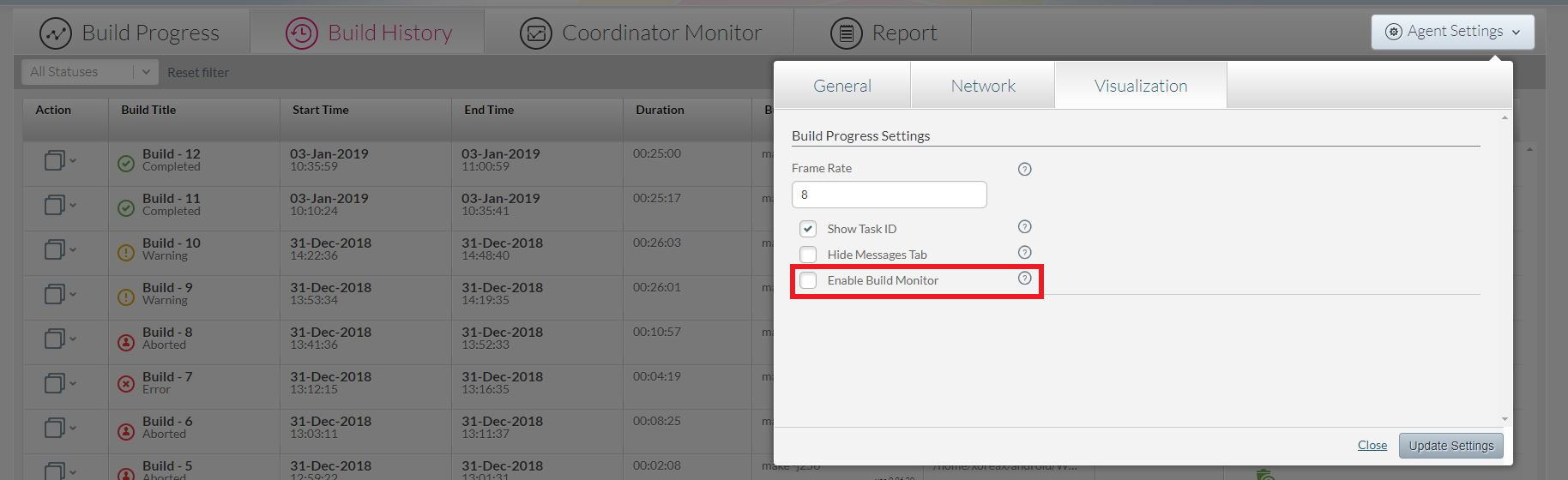
* A new option that improves execution performance by up to additional \~20% was added to the product. This option disables the ability to view data collected by Incredibuild that is used for displaying the Incredibuild graphical build monitor and used for the build queries. Console window build output and build history information is still available when this option is used. There are two ways to use this option:
* Add the --no-monitor flag to the ib\_console command line.
* In the initiating machine's Agent Setting, disable the "Enable Build Monitor" check box under the Visualization tab:
 * Some general performance optimizations may increase performance by up to additional 7%.
### Miscellaneous
* Incredibuild now maintains the license core allocation across Agents when a new license is loaded to the Coordinator.
* Various stability bug fixes
## Version 0.95.12
### Build Systems support:
* Incredibuild now offers experimental support for the Bazel build system. A benchmark for compiling the popular TensorFlow project showed a **x7.5 acceleration boost**, bringing TensorFlow compilation from 65 minutes down to 8.5 minutes.
* To run Bazel builds with Incredibuild the following should be added to the regular Bazel command:
*--jobs=N --local\_resources=R,N,1*
where N is the total number of cores on and your Incredibuild infrastructure while the R parameter should be N\*200, i.e. if there are 70 cores on your Incredibuild infrastructure, the command should be:
*--jobs=70 --local\_resources=14000,70,1*
* ccache support: Incredibuild now fully supports ccache in all operating modes (explicit invocation and implicit via soft link) - see ccache manual for details [https://ccache.samba.org/manual.html#\_run\_modes](https://ccache.samba.org/manual.html#_run_modes)
ccache database created while using Incredibuild might be used by builds that are executed without Incredibuild and vise-versa, i.e. there is a full interoperability of ccache regardless of Incredibuild invocation.
### Installation:
* In order to avoid trouble during Incredibuild version upgrade on the customer side, a new utility script is introduced: ib\_apply\_upgrade.sh (resides in /opt/incredibuild/management). This script should be executed with sudo on the machine where the Coordinator is installed and receives a single parameter – the upgrade tar file. Example command line:
*sudo /opt/incredibuild/management/ib\_apply\_upgrade.sh Incredibuild\_upgrade\_0.94.95.tar.bz2*
This way it will be properly extracted to the correct location, and the Coordinator then updates all of the agents on the network to its own version.
* Changes in the Incredibuild n installation:
-O \ now is required only when -C option is not given. When installing the coordinator, it should always use the localhost, therefore -O is not required and even ineligible in this case.
### Miscellaneous:
* chroot management scripts were updated to correctly support schroot:
Now there are two scripts: ib\_chroot.sh and ib\_schroot.sh
ib\_chroot.sh is for regular chroots – the syntax remained the same.
ib\_schroot.sh is for schroot users. The main difference is that ib\_schroot.sh expects a name of chroot as a parameter instead of a directory where chroot is created. This complies with the regular syntax of schroot. Add and remove semantics are the same and are displayed in the command line help.
Important: In order to make schroot directories be accessible by Incredibuild, the following line should be added to the file /etc/schroot/default/fstab
*/opt/incredibuild /opt/incredibuild none ro,bind 0 0*
* Some general performance optimizations may increase performance by up to additional 7%.
### Miscellaneous
* Incredibuild now maintains the license core allocation across Agents when a new license is loaded to the Coordinator.
* Various stability bug fixes
## Version 0.95.12
### Build Systems support:
* Incredibuild now offers experimental support for the Bazel build system. A benchmark for compiling the popular TensorFlow project showed a **x7.5 acceleration boost**, bringing TensorFlow compilation from 65 minutes down to 8.5 minutes.
* To run Bazel builds with Incredibuild the following should be added to the regular Bazel command:
*--jobs=N --local\_resources=R,N,1*
where N is the total number of cores on and your Incredibuild infrastructure while the R parameter should be N\*200, i.e. if there are 70 cores on your Incredibuild infrastructure, the command should be:
*--jobs=70 --local\_resources=14000,70,1*
* ccache support: Incredibuild now fully supports ccache in all operating modes (explicit invocation and implicit via soft link) - see ccache manual for details [https://ccache.samba.org/manual.html#\_run\_modes](https://ccache.samba.org/manual.html#_run_modes)
ccache database created while using Incredibuild might be used by builds that are executed without Incredibuild and vise-versa, i.e. there is a full interoperability of ccache regardless of Incredibuild invocation.
### Installation:
* In order to avoid trouble during Incredibuild version upgrade on the customer side, a new utility script is introduced: ib\_apply\_upgrade.sh (resides in /opt/incredibuild/management). This script should be executed with sudo on the machine where the Coordinator is installed and receives a single parameter – the upgrade tar file. Example command line:
*sudo /opt/incredibuild/management/ib\_apply\_upgrade.sh Incredibuild\_upgrade\_0.94.95.tar.bz2*
This way it will be properly extracted to the correct location, and the Coordinator then updates all of the agents on the network to its own version.
* Changes in the Incredibuild n installation:
-O \ now is required only when -C option is not given. When installing the coordinator, it should always use the localhost, therefore -O is not required and even ineligible in this case.
### Miscellaneous:
* chroot management scripts were updated to correctly support schroot:
Now there are two scripts: ib\_chroot.sh and ib\_schroot.sh
ib\_chroot.sh is for regular chroots – the syntax remained the same.
ib\_schroot.sh is for schroot users. The main difference is that ib\_schroot.sh expects a name of chroot as a parameter instead of a directory where chroot is created. This complies with the regular syntax of schroot. Add and remove semantics are the same and are displayed in the command line help.
Important: In order to make schroot directories be accessible by Incredibuild, the following line should be added to the file /etc/schroot/default/fstab
*/opt/incredibuild /opt/incredibuild none ro,bind 0 0*