

Overview
Build Cache saves time and resources by reusing portions of previous builds. As you run builds, we store the outputs in a file cache. When future builds are run, we check the cache to avoid regenerating portions of the build that have not changed. This can have a major impact, as you can reuse previous build data stored in Build Cache to drastically reduce build times without impacting your bandwidth. You can use Build Cache locally by creating and reusing content from a single machine, create a shared cache for more than one Initiator (beta feature), or use both local and shared. To use Build Cache when running projects, add the parameters below to your build commands. This checks to see if there is anything useful in the cache, and stores the build you are running in the cache for future use. If you are using shared cache, you also need to install the Build Cache Service on a dedicated machine. Using local build cache requires additional storage space on the Initiator machine. We recommend allocating at least twice the size of the project output folder.Local vs. Shared Build Cache
Note: Shared Cache is currently a beta feature. Contact your Customer Success Manager to join the beta program. You can use both a local and a shared Build Cache in the same build command. To use a local cache, simply use the —build-cache-local parameters when running a build (details below). To use a shared cache, you install the Build Cache Service on a dedicated machine, and then use the parameters below. An additional flag is required to point to the Build Cache Service. When both local and shared are used, Incredibuild uses the following flow when building each object:- Check the local cache, if there is a cache hit retrieve it and avoid building the object.
- If there is no local cache hit, check the shared cache. If there is a shared cache hit, retrieve it and avoid building the object. Afterwards, update the local cache.
- If there is no local or shared cache hit, build the object and update both the local and shared caches.
Installing the Build Cache Service
If you are using shared cache, you need to install the Build Cache Service on a dedicated machine. Use the following format:Build Cache Parameters
The following parameters can be added to your build command to use Build Cache. Even if Build Cache is enabled, the parameters must be used on every build that you want to use Build Cache.Build Examples
Run local cache only for all users on an initiatorib_console --build-cache-local-shared --build-cache-basedir=/home/myuser/opencv make -j 40
Run local and shared cache
ib_console --build-cache-local-shared --build-cache-service=http://192.54.11.9:8080 --build-cache-basedir=/home/myuser/opencv make -j 40
Local Cache Settings
You can edit the local Build Cache size in the Agent Settings > General > Local Build Cache Size setting. This can also be configured when installing an Initiator.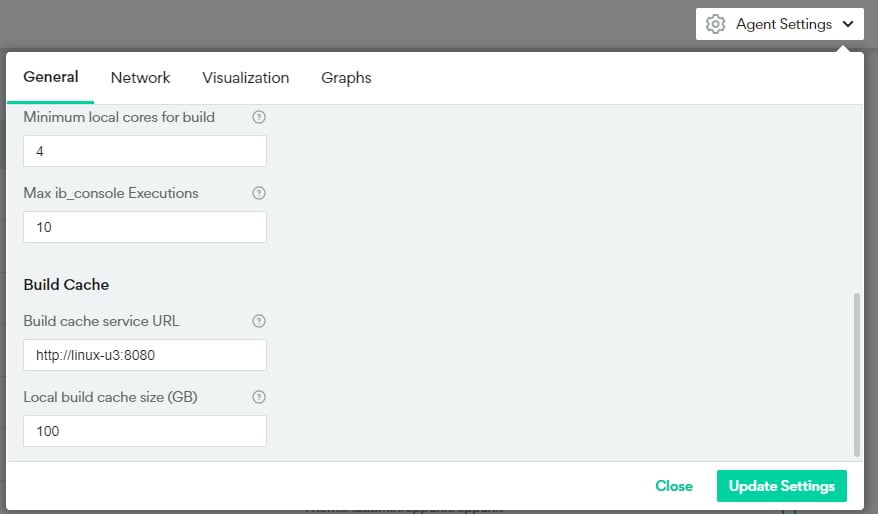
-
Return information about the location and size of your local build cache:
-
Set the local build cache size. By default, the size is 100GB, but you can modify it:
-
Clear the local build cache:
Shared Cache Settings
You can define a default Build Cache Service in the Agent Settings > General > Build Cache Service URL setting. If you use the —build-cache-service parameter with no value, the value defined here will be used. If you specify a different value, it will override the value in the Agent Settings. You can also modify this setting using the command line interface.-
Get the shared build cache size. By default, the size is 100GB:
-
Set the shared build cache size. By default, the size is 100GB.
-
Return the location of the shared build cache on the Build Cache Service machine:
-
Clear the shared build cache:
-
Return the currently used size of the Build Cache on the Build Cache Service machine: