> ## Documentation Index
> Fetch the complete documentation index at: https://docs.incredibuild.com/llms.txt
> Use this file to discover all available pages before exploring further.
# Exploring the Distribution Types of Tools and Processes
Last updated on Nov 05, 2024
**Important!** If a custom process is not specified in the ib\_profile.xml file, it will be handled as **local\_only.**
For each tool and process that is registered in the ib\_profile.xml file, one of the following distribution types should be set:
* **local\_only**
The process can be executed on the local machine only. The process may be parallelized across multiple cores on the local machine, but it will not be processed remotely. This configuration is typically used for processes with low levels of parallelization. In these cases, the number of cores on the local machine may be enough to process it quickly, since local processing is faster than remote processing. It is also useful for processes that are reading and writing a lot of data from and to the disk. A typical process that is best run on the local machine is a linking process.
If a process is not listed in any of the instances of the ib\_profile.xml file, by default this process will be treated as **local\_only**, and it will not be distributed to remote machines. However, if you deliberately do not want a process to run remotely, it is strongly recommended to explicitly specify this, in order to avoid the overriding of this default setting by other ib\_profile.xml files. In this case, add the process entry to an ib\_profile.xml file, and set its distribution type to **local\_only**.
For example:
```
```
* **allow\_remote** – the process can be executed both on the local machine and on remote machines.
This configuration is typically used for processes with high level of parallelization. To instruct Incredibuild Linux that a certain process can be distributed to remote Agent machines, add the process entry to an ib\_profile.xml file, and set its distribution type to **allow\_remote**.
For example:
```
```
* **intercepted** – this distribution type instructs Incredibuild Linux to examine the specified process to see if it includes child processes that are set as **allow\_remote**. If the ib\_profile.xml includes an **allow\_remote** process, ALL the processes in the build process tree that lead to the execution of this process, must be set as **intercepted**.
```
```
Suppose, for example, we are executing a build by running a script file named “MyBuilder”. The MyBuilder script executes a “MyMake” process, which in turn executes a compilation process, "MyCompiler". In this case, the MyBuilder script and MyMake process should be set as **intercepted**, and the MyCompiler process as **allow\_remote**. If the MyBuilder script also executes a "MyLinker" process, the MyLinker process should be set as **local\_only**.
 In the ib\_profile.xml file, these processes will be set as follows:
```
```
**Intercepted** processes are not displayed in the Build Monitor. Only processes that are defined as either **local\_only** or **allow\_remote** are displayed.
If a process that is defined as **allow\_remote** spawns child processes, the parent process and the child processes will run on the same place, and will be displayed in the same bar on the Build Monitor. This occurs because Incredibuild Linux ignores the definition of processes, which are the children of a process that is defined as **allow\_remote**.For example, suppose the MyMake script has a child process called "gcc", but MyMake is defined as **allow\_remote** and not as **intercepted**. In this case, the child processes are not distributed separately by Incredibuild Linux, and are not displayed in the Build Monitor:
In the ib\_profile.xml file, these processes will be set as follows:
```
```
**Intercepted** processes are not displayed in the Build Monitor. Only processes that are defined as either **local\_only** or **allow\_remote** are displayed.
If a process that is defined as **allow\_remote** spawns child processes, the parent process and the child processes will run on the same place, and will be displayed in the same bar on the Build Monitor. This occurs because Incredibuild Linux ignores the definition of processes, which are the children of a process that is defined as **allow\_remote**.For example, suppose the MyMake script has a child process called "gcc", but MyMake is defined as **allow\_remote** and not as **intercepted**. In this case, the child processes are not distributed separately by Incredibuild Linux, and are not displayed in the Build Monitor:
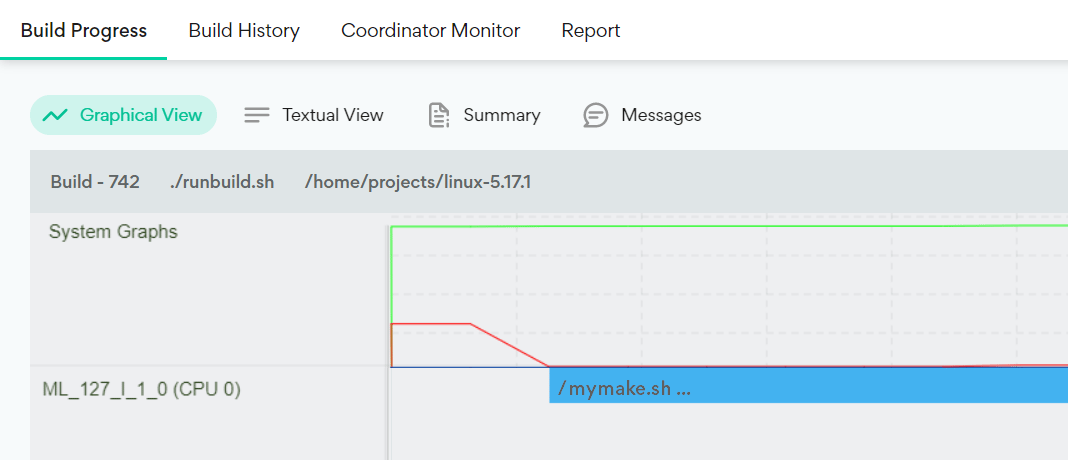 Alternatively, if the MyMake script is defined as **intercepted**, its gcc child processes are distributed separately by Incredibuild Linux, and consequently they appear in the Build Monitor:
