> ## Documentation Index
> Fetch the complete documentation index at: https://docs.incredibuild.com/llms.txt
> Use this file to discover all available pages before exploring further.

# API Keys

Last updated on Dec 22, 2025

This feature is only available in Incredibuild's [Enterprise Plan](/windows/10.34.1/pricing-plans).

To enhance security for our API calls, you need to use an API key in every API call.

1. In the **Coordinator Manager**, go to **Settings** > **API Access** and click **Generate API Key**.

   <img src="https://mintcdn.com/incredibuild-docs-migrated/gPyRCIL07ES5uPuP/images/windows/10.34.1/windows/api_key_2.png?fit=max&auto=format&n=gPyRCIL07ES5uPuP&q=85&s=b0a74d159552b8d90b4bef20a198250a" alt="" width="1909" height="928" data-path="images/windows/10.34.1/windows/api_key_2.png" />

2. Enter a description to identify the API Key, and specify the type of users who are allowed to use this key. Click **Add Key**.

   <img src="https://mintcdn.com/incredibuild-docs-migrated/gPyRCIL07ES5uPuP/images/windows/10.34.1/windows/api_key_generate.png?fit=max&auto=format&n=gPyRCIL07ES5uPuP&q=85&s=b175b9b37aab59fdf1886acfb0791dcf" alt="" width="1440" height="900" data-path="images/windows/10.34.1/windows/api_key_generate.png" />

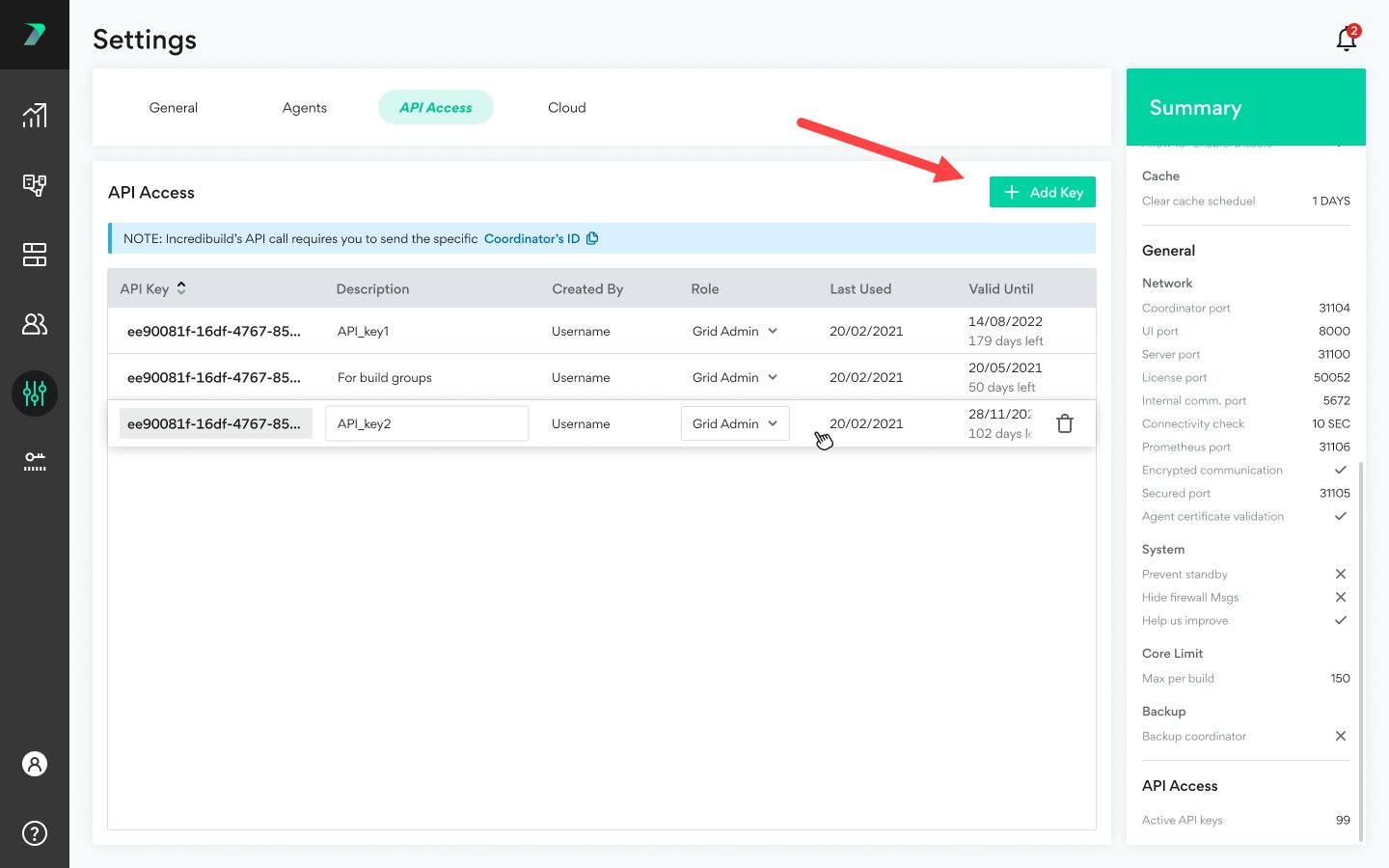
3. You can add additional API Keys by clicking **Add Key**.
   <img src="https://mintcdn.com/incredibuild-docs-migrated/gPyRCIL07ES5uPuP/images/windows/10.34.1/windows/api_key_add.png?fit=max&auto=format&n=gPyRCIL07ES5uPuP&q=85&s=8ec3b12c610d614f0f85c22e093da153" alt="" width="1440" height="900" data-path="images/windows/10.34.1/windows/api_key_add.png" />

4. You can **copy** your Coordinator's ID to the clipboard to help you create API's.

   <img src="https://mintcdn.com/incredibuild-docs-migrated/gPyRCIL07ES5uPuP/images/windows/10.34.1/windows/api_key_copy_coord_id.png?fit=max&auto=format&n=gPyRCIL07ES5uPuP&q=85&s=e093ba43fed489d8d459d960e5d060ab" alt="" width="1897" height="706" data-path="images/windows/10.34.1/windows/api_key_copy_coord_id.png" />

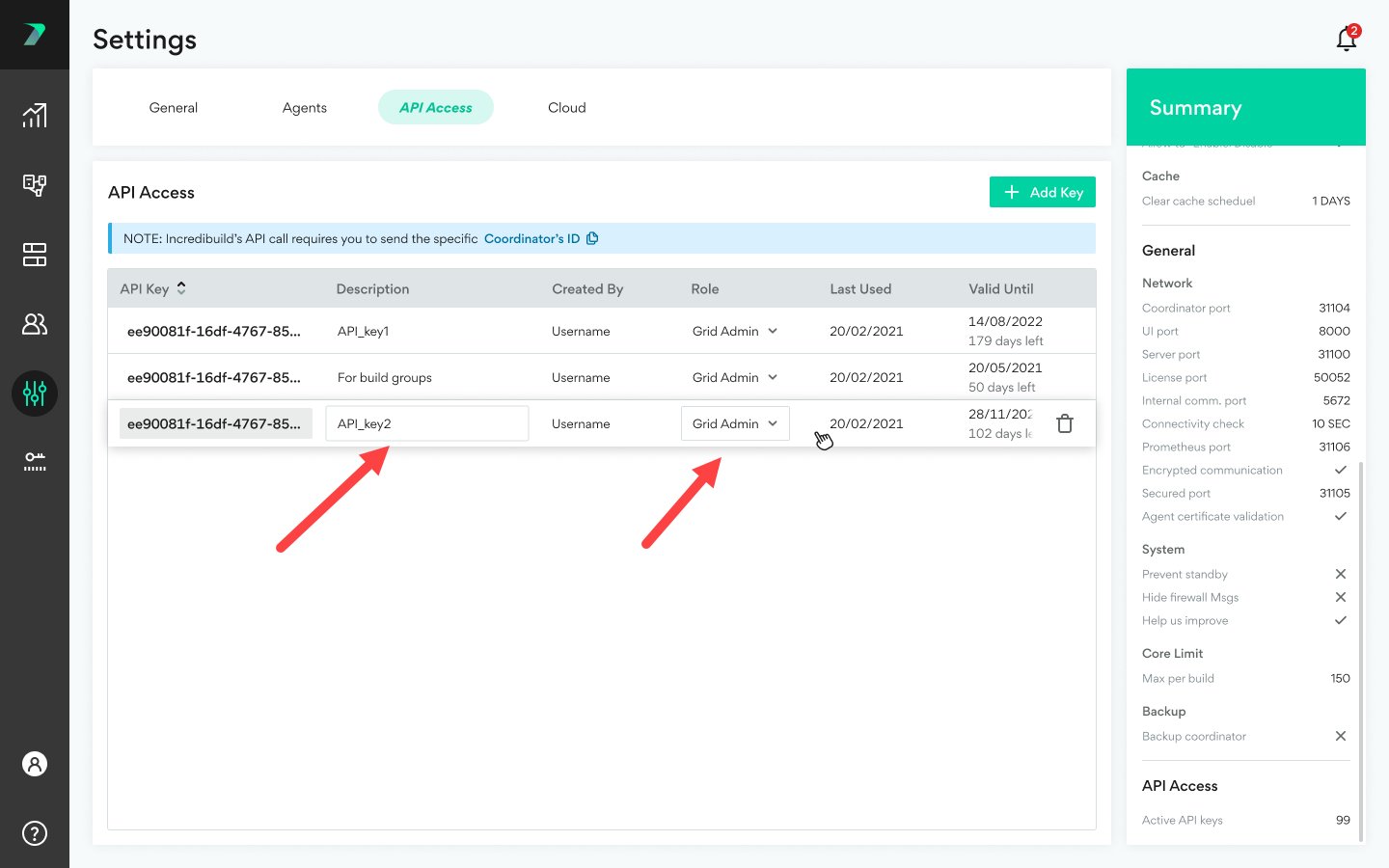
5. You can **edit** an API Key by clicking the values in the columns and changing them.
   <img src="https://mintcdn.com/incredibuild-docs-migrated/gPyRCIL07ES5uPuP/images/windows/10.34.1/windows/api_key_edit.png?fit=max&auto=format&n=gPyRCIL07ES5uPuP&q=85&s=681a7814ecd12f8135bd5bd70c8d4a4d" alt="" width="1440" height="900" data-path="images/windows/10.34.1/windows/api_key_edit.png" />

6. You can **delete** an API Key by clicking the trash icon.

   <img src="https://mintcdn.com/incredibuild-docs-migrated/gPyRCIL07ES5uPuP/images/windows/10.34.1/windows/api_key_delete.png?fit=max&auto=format&n=gPyRCIL07ES5uPuP&q=85&s=d67bc0115126aabd8df887f4a458a6d8" alt="" width="1915" height="916" data-path="images/windows/10.34.1/windows/api_key_delete.png" />
