> ## Documentation Index
> Fetch the complete documentation index at: https://docs.incredibuild.com/llms.txt
> Use this file to discover all available pages before exploring further.
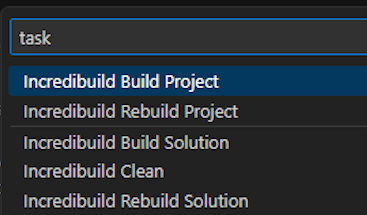
# Running Builds in Visual Studio Code
Last updated on Dec 22, 2025
You can run different types of projects (e.g. Ninja, MSBuild, CMake) inside the Visual Studio Code IDE by using their tasks.json file with Incredibuild settings.
The tasks.json file was designed by Visual Studio Code for running external tools, and must be customized for Incredibuild. To learn more, see the [Visual Studio Code documentation](https://code.visualstudio.com/docs/editor/tasks).
## Prepare tasks.json File
Use one of the following sample files. Modify the **command** line to match your Incredibuild build command and project. To learn more about incredibuild build commands, see [Running Builds in Visual Studio Code](/windows/10.34.1/build-console-cli) and [Running Builds in Visual Studio Code.](/windows/10.34.1/running-from-command-line)
[Copy](javascript:void\(0\);)
```
{
"version": "2.0.0",
"tasks": [
{
"label": "Incredibuild Build Solution",
"type": "shell",
"command": "buildconsole ${workspaceFolder}\\${solution file.sln} /build /cfg='Release|x64'",
"group": {
"kind": "build",
"isDefault": true
},
"presentation": {
"reveal": "always",
"panel": "new"
},
"problemMatcher": "$msCompile"
},
{
"label": "Incredibuild Rebuild Solution",
"type": "shell",
"command": "buildconsole ${workspaceFolder}\\${solution file.sln} /rebuild /cfg='Release|x64'",
"group": {
"kind": "build",
"isDefault": true
},
"presentation": {
"reveal": "always",
"panel": "new"
},
"problemMatcher": "$msCompile"
},
{
"label": "Incredibuild Build Project",
"type": "shell",
"command": "buildconsole ${workspaceFolder}\\${solution file.sln} /prj=${project file.vcxproj} /build /cfg='Release|x64'",
"group": {
"kind": "build",
"isDefault": true
},
"presentation": {
"reveal": "always",
"panel": "new"
},
"problemMatcher": "$msCompile"
},
{
"label": "Incredibuild Rebuild Project",
"type": "shell",
"command": "buildconsole ${workspaceFolder}\\${solution file.sln} /prj=${project file.vcxproj} /rebuild /cfg='Release|x64'",
"group": {
"kind": "build",
"isDefault": true
},
"presentation": {
"reveal": "always",
"panel": "new"
},
"problemMatcher": "$msCompile"
}
]
}
```
[Copy](javascript:void\(0\);)
```
{
"version": "2.0.0",
"tasks": [
{
"type": "shell",
"label": "Clean",
"command": "C:\\CMake\\bin\\cmake.EXE --build ${workspaceFolder}\\build --config Release --target clean",
"group": "build",
"problemMatcher": [],
"detail": "CMake template clean task"
},
{
"type": "cmake",
"label": "CMake: clean",
"command": "clean",
"targets": [
"clean"
],
"group": "build",
"problemMatcher": [],
"detail": "CMake template clean task"
},
{
"type": "shell",
"label": "Incredibuild build Solution",
"command": "buildconsole /command='C:\\CMake\\bin\\cmake.EXE --build ${workspaceFolder}\\build --config Release --target ALL_BUILD -j 100'",
"group": "build",
"problemMatcher": [],
"detail": "CMake template build task"
},
{
"type": "cmake",
"label": "CMake: build",
"command": "build",
"targets": [
"ALL_BUILD"
],
"group": "build",
"problemMatcher": [],
"detail": "CMake template build task"
},
{
"type": "shell",
"label": "Incredibuild build Project",
"command": "buildconsole /command='C:\\CMake\\bin\\cmake.EXE --build ${workspaceFolder}\\build --config Release --target BlendThumb -j 100'",
"group": "build",
"problemMatcher": [],
"detail": "CMake template build task"
},
{
"type": "cmake",
"label": "CMake: build",
"command": "build",
"targets": [
"BlendThumb"
],
"group": "build",
"problemMatcher": [],
"detail": "CMake template build task"
},
{
"label": "Incredibuild Rebuild Solution",
"dependsOrder": "sequence",
"dependsOn": ["Clean", "Incredibuild build Solution"]
},
{
"label": "Incredibuild Rebuild Project",
"dependsOrder": "sequence",
"dependsOn": ["Clean", "Incredibuild build Project"]
}
]
}
```
## Upload and Use the tasks.json File
This procedure was created based on the [Visual Studio Code documentation](https://code.visualstudio.com/docs/editor/tasks), taken from version 1.84. It may be different in later versions if Visual Studio Code changes the way their product handles these files.
1. Copy your tasks.json to the .vscode folder of your project.
2. Inside Visual Studio Code, press `Ctrl+Shift+B` or **Run Build Task** from the global Terminal menu.
3. Type **task** in the search bar to display the list of build options from the Incredibuild tasks.json file such as Build Project, Rebuild Project, etc.