> ## Documentation Index
> Fetch the complete documentation index at: https://docs.incredibuild.com/llms.txt
> Use this file to discover all available pages before exploring further.
# Network
Last updated on Dec 22, 2025
## **General**
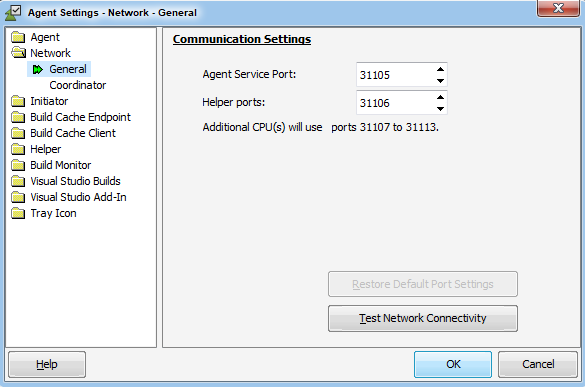
The **General** page controls how the Agent interacts with other Incredibuild components in the network:
 ### Communication Settings
Determines the TCP/IP ports used to communicate with other Incredibuild components.
#### Test Network Connectivity
This button opens the [Network Connectivity Test](https://www.Incredibuild.com/webhelp/advanced_network_test.html) window, which can help locate Agents with weak network performance.
## **Coordinator**
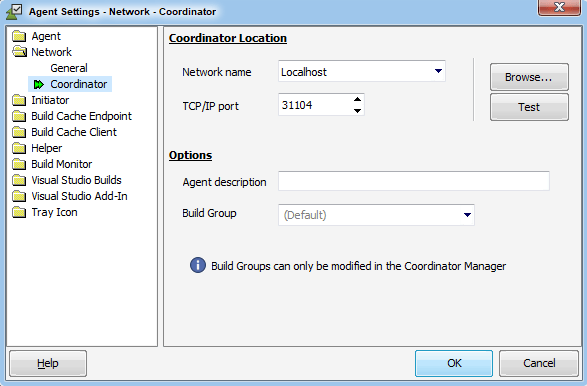
The **Coordinator** page is used to identify the computer running Incredibuild Coordinator, and to set Coordinator-related options:
### Communication Settings
Determines the TCP/IP ports used to communicate with other Incredibuild components.
#### Test Network Connectivity
This button opens the [Network Connectivity Test](https://www.Incredibuild.com/webhelp/advanced_network_test.html) window, which can help locate Agents with weak network performance.
## **Coordinator**
The **Coordinator** page is used to identify the computer running Incredibuild Coordinator, and to set Coordinator-related options:
 ### Coordinator Location
Defines the Coordinator machine's name/IP address and the TCP/IP port it uses to communicate with the Agent. If this was set during the Setup procedure, these values should be left unchanged unless the Coordinator service was transferred to another machine. The **Browse...** button may be used to select computers from your network neighborhood. You can use the **Test** button to see if a successful connection to a Coordinator can be established using the displayed settings.
### Options
The **Agent description** field can be used to supply a text string that will identify this computer in the Coordinator Monitor Agent list. The Agent Description will appear next to the Agent name in the list, which can be useful in an Environment that contains many Agents. If no value is provided, Incredibuild will use the text given for the computer's network identification Description field (empty by default). This field only supports English characters.
### Coordinator Location
Defines the Coordinator machine's name/IP address and the TCP/IP port it uses to communicate with the Agent. If this was set during the Setup procedure, these values should be left unchanged unless the Coordinator service was transferred to another machine. The **Browse...** button may be used to select computers from your network neighborhood. You can use the **Test** button to see if a successful connection to a Coordinator can be established using the displayed settings.
### Options
The **Agent description** field can be used to supply a text string that will identify this computer in the Coordinator Monitor Agent list. The Agent Description will appear next to the Agent name in the list, which can be useful in an Environment that contains many Agents. If no value is provided, Incredibuild will use the text given for the computer's network identification Description field (empty by default). This field only supports English characters.