> ## Documentation Index
> Fetch the complete documentation index at: https://docs.incredibuild.com/llms.txt
> Use this file to discover all available pages before exploring further.
# Opening the Coordinator Monitor and Verifying the Installation Success
To verify that the Coordinator and an Agents were installed successfully on your local machine, open the Coordinator Monitor.
**To open the Coordinator Monitor:**
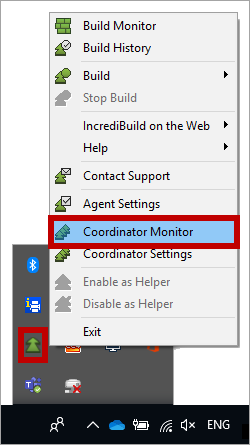
* On the taskbar, right-click **Incredibuild Agent** icon, and select **Coordinator Monitor**:
 **Note**: You can also open the Coordinator Monitor from the **Start** menu > **Incredibuild** > **Incredibuild Coordinator**.
The Coordinator Monitor appears, displaying the Agents that were installed:
**Note**: You can also open the Coordinator Monitor from the **Start** menu > **Incredibuild** > **Incredibuild Coordinator**.
The Coordinator Monitor appears, displaying the Agents that were installed:
