Build Cache - Monitoring and Diagnosing Efficiency
This feature is only available in Incredibuild's Enterprise and Business Plans.
Monitoring the Effectiveness of Build Cache
Details of how much time was saved from using the Build Cache is included in the output of all of your builds. This can be seen in the summary tab of the Build Monitor, as well as the output you see in the command line.
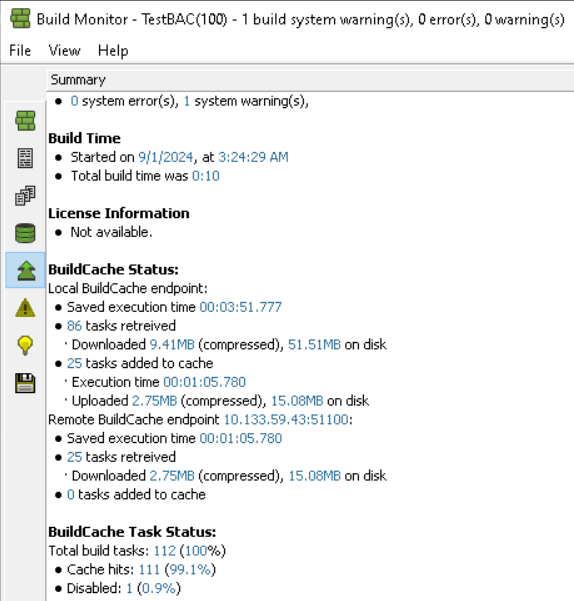
Note: The sizes of submitted and restored files may differ slightly from your original files, and may differ from each other due to metadata that Incredibuild adds to the files.
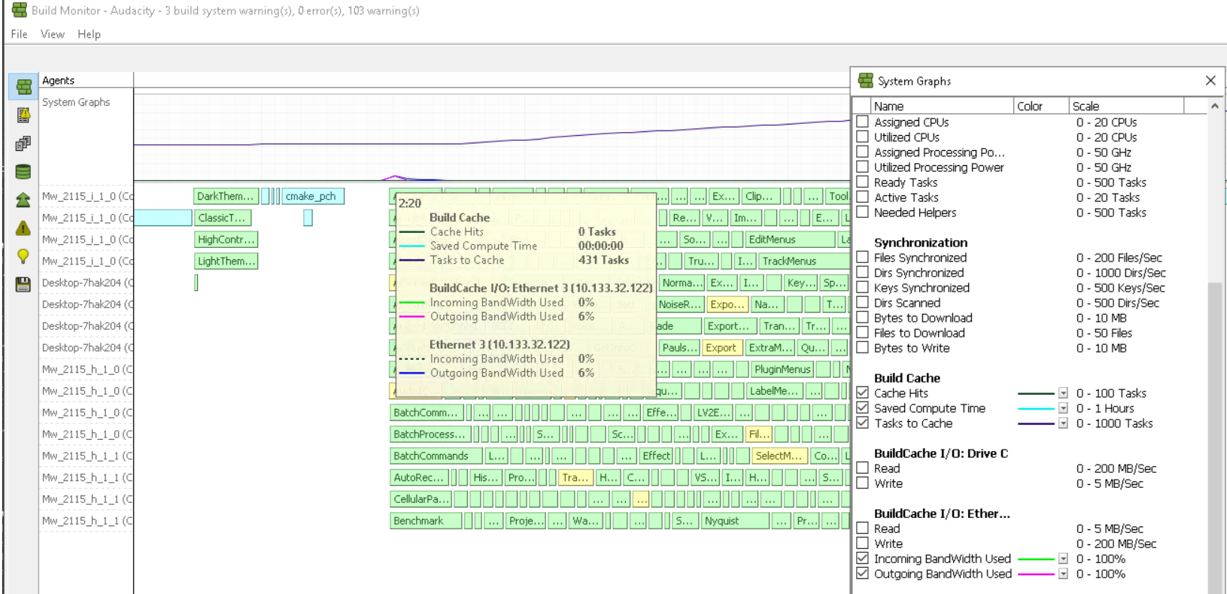
You can also see the cache hit rate in the Build Monitor's Progress Display:
-
Tasks to cache are tasks that were executed and are candidates to be added to the Build Cache for future builds.
-
Cache hits are tasks that were retrieved from the Build Cache instead of being executed.
Cache Sizing Warnings
If any tasks were not cached because the Build Cache was full, you can view the warnings in the Build Monitor > Warnings tab.
In the Build Cache section, the following warnings indicate an issue with your Build Cache size:
-
System low on free space
-
Endpoint rejected caching of X tasks....due to cache size limitation
-
Build Cache endpoint is unable to fully cache this build. Please consider increasing the cache size.
Examining Cache Efficiency Further
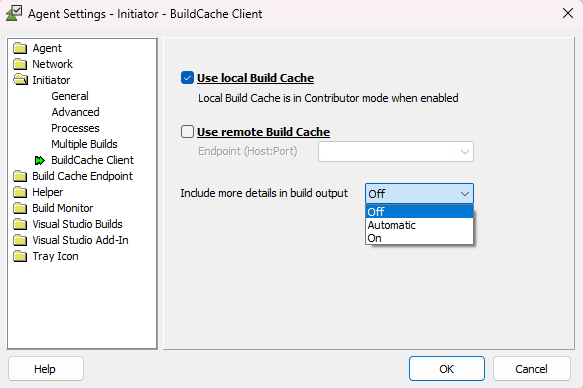
If the hit rate is low, you can investigate the reason by enhancing the output to include information about each task. Go to Agent Settings > Initiator > Build Cache Client Settings and change Include more details in build output to on.
Note that this may take time and slow down your build. In extreme cases (40,000 tasks) this has been seen to take up to 15 minutes beyond your expected build time.
Run another build and examine the Build Cache tab in the Build Monitor. This includes a detailed Build Cache hit/miss report with extensive information about each task, including whether it was a hit or miss, and in case of cache miss it will show you the reason for the miss.
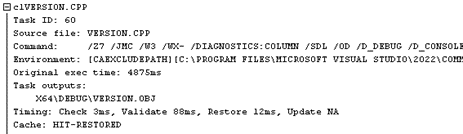
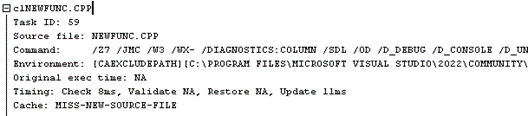
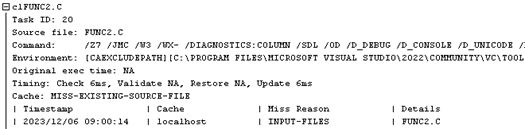
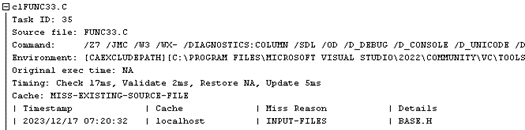
Every task in your build appears in the report. Expand a task to see the exact information about the task and how Build Cache was able to handle it, as denoted in the Cache line:
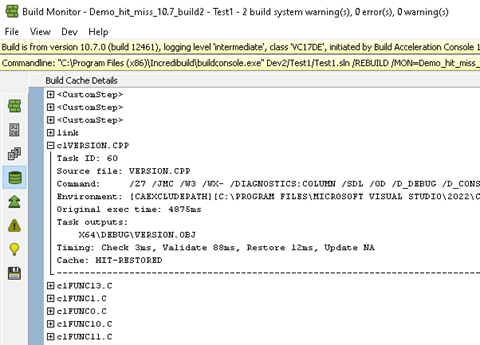
The cache behavior for each task is visible on the line starting with “Cache”.
For a full list of reasons for HITs, MISSES, and SKIPs, see Reasons.
The values may typically include the following:
-
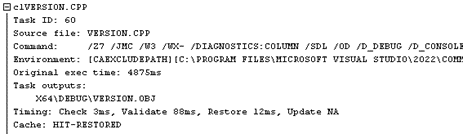
HIT-RESTORED
This task was found in the cache, and the task contents were retrieved saving the need to re-execute the task again. The line with Original exec time shows how long the task took originally – this is the time you saved by using Build Cache.
-
HIT-LICENSE-TEMPORARILY-DEPLETED
This task was found in the cache but was not retrieved but rather was re-executed. This is because the Cache Cores license was depleted, pending the next reset time. This is an indication that your Cache Cores license cannot sustain the current load of Build Cache activity.
-
SKIP-UNSUPPORTED-TOOL
The task was executed because Build Cache does not support the relevant tool.

-
SKIP-DISABLED-TOOL
The task was executed because, although Build Cache support the relevant tool, it is disabled in the configuration. Depending on the case, it is possible to enable the tool and improve the hit rate for the build.

-
SKIP-PROFILE-FILTER
The compilation task was executed (and not cached) because it is of a specific file type that is not included in the cache.
-
MISS-DATA-DELETED
The task was executed because the cached item was evacuated earlier. The cache content is automatically purged periodically to remove redundant items. Had the cache been larger, it is possible that the relevant item would have been found and retrieved, improving the build hit rate.
-
MISS-NEW-SOURCE-FILE
The task was executed because the source file has never been compiled before. Note: it is expected that all tasks of the first build on an empty (cold) cache will show this cache behavior.

-
SKIP-MANAGED-C++ (Deprecated. Replaced by SKIP-PROFILE-FILTER)
The compilation task was executed because it compiles managed C++ code, which Build Cache doesn’t support.
-
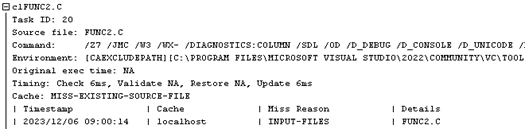
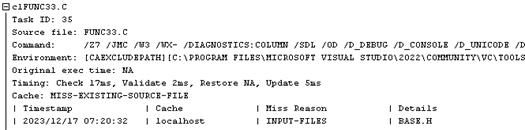
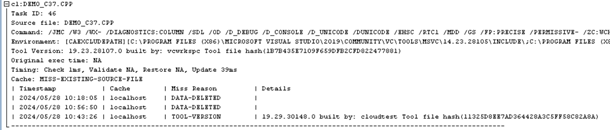
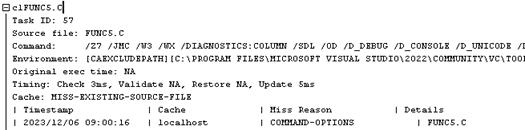
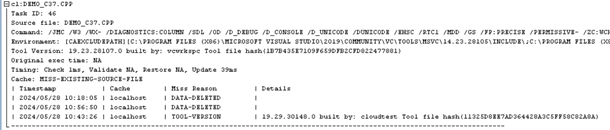
MISS-EXISTING-SOURCE-FILE
The task was executed before and stored in the cache, but none of the cached items can be used for this build.
In this case, the report includes a table with the relevant cached items (from previous builds) and the reason why they can’t be used: INPUT-FILES (source or header mismatch), TOOL-VERSION (compiler or toolchain mismatch), COMMAND-OPTIONS (command line mismatch), or ENV-VARS (environment variables mismatch).



Reasons for HITs, MISSES, and SKIPs
The lists below include a full list of reasons for HITs, Manifest-level MISSES, Task-level MISSes, and SKIPs
Hits
-
HIT-RESTORED
A valid cached task was found and successfully restored
-
HIT-LICENSE-TEMPORARILY-DEPLETED
A valid cache match was found, but restore was blocked due to depleted Build Cache license.
-
HIT-UNRESTORED
A valid cached task was found but restoration failed.
Manifest-Level Misses
Manifest-level miss reasons (sub miss reasons). In the MISS examples below, the cache was involved, but no match was usable:
-
COMMAND-OPTIONS:
Command-line options were different than cached entries. -
ENV-VARS
Specific environment variables are different. -
INPUT-FILES:
At least one file required by the task has changed compared to all previous manifests. -
TOOL-VERSION
The tool binary or version changed.
Task-Level Misses
-
MISS-CLUSTER-COMPOSITION-CHANGED
The nodes of a cluster have changed, causing the data to be spread differently in the cluster. Next build is expected to provide a hit from the new node -
MISS-DATA-DELETED
Relevant entry matched but has been evicted from the cache. -
MISS-EXISTING-SOURCE-FILE
Input file existed before, but contents changed. -
MISS-NEW-SOURCE-FILE:
A new direct input file not seen before (by name, not just contents). -
MISS-THRESHOLD-NOT-MET:
Some tools (task types) can define that tasks are not automatically submitted to the cache. The first iterations of tasks are used to collect meta-data and detect if a task can be a hit. Once the threshold is met then the task is submitted to the cache and can be fetched in the next iteration. -
MISS-UNKNOWN
Unable to determine exact reason (diagnostic fallback).
SKIP Reasons
In the SKIP examples below, the cache was deliberately not used due to limitations or configuration. Reasons for Manifest-level misses are based on the hash.
-
SKIP-DISABLED-TOOL
Tool listed, but explicitly disabled in config.
-
SKIP-MANAGED-C++:
Task involves Managed C++, which is generally unsupported.
-
SKIP-NON-CACHEABLE:
Task flagged as inherently not cacheable (e.g., due to custom flags or I/O).
-
SKIP-PROFILE-FILTER:
Profile explicitly filters the task out.
-
SKIP-PROJECT-EXCLUDED:
Excluded project as per user configuration.
-
SKIP-STDIN-INPUT:
Skipped due to input provided via stdin. When a Standard Input Pipe is detected during a task execution it is tagged as using stdin and skipped. Incredibuild cannot check the input pipe before a task is started, thus, cannot provide a cache hit
-
SKIP-UNLICENSED-TOOL:
Task skipped due to licensing issues.
-
SKIP-UNSUPPORTED-TOOL:
Tool not listed in profile.xml.