Build Cache - Architecture
This feature is only available in Incredibuild's Enterprise and Business Plans and is currently in limited availability. For more details, speak to your Customer Success Representative.
Build Cache Components
An Incredibuild Initiator Agent using Build Cache is called a Build Cache Client. An Incredibuild Agent storing and serving Build Cache is called a Build Cache Endpoint. The Build Cache service is installed on every Incredibuild Agent. An Agent becomes an Endpoint when one or more clients use it as an Endpoint.
By default, any Initiator Agent that has Build Cache enabled acts as it's own Endpoint. You can work with a remote Endpoint that can be shared across multiple Clients by changing the Agent's Build Cache Client settings.
Deployment Examples
Build cache can be deployed in different ways depending on how your Clients connect to Endpoints. A single Client can function as its own Endpoint (local), multiple Clients can connect to a single Endpoint (remote), and more complex or dynamic deployments are possible as well.
 Local Cache Deployment
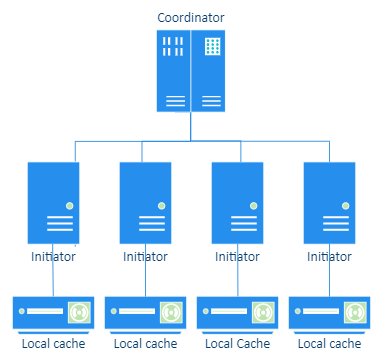
Local Cache refers to using the same Initiator Agents to host the Build Cache Endpoint and Build Cache Client. This means that each agent can only benefit from the cache of builds that were previously run on the same machine. This can be ideal if you are not sharing code with other developers, or if you are working from home with limited bandwidth.
Remote Cache Deployment
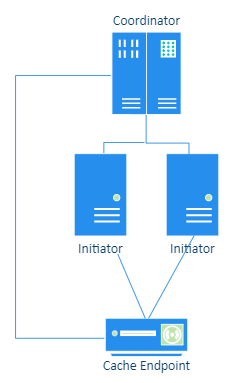
Remote Cache refers to using a single dedicated Agent to host the Build Cache Endpoint. Multiple Initiator Agents contribute and benefit from the same build cache.
Local + Remote Cache Deployment
You can enable both Local and Remote Caches. If both are enabled, Incredibuild uses the following logic for each task whenever a build is run:
-
Check the local cache. If there is a cache hit, it is used. If there is a cache miss, the remote cache is checked.
-
If there is a remote cache hit, use the data and update the local cache.
-
If there is no remote cache hit, run the task and update the local cache.
Dynamic Deployments
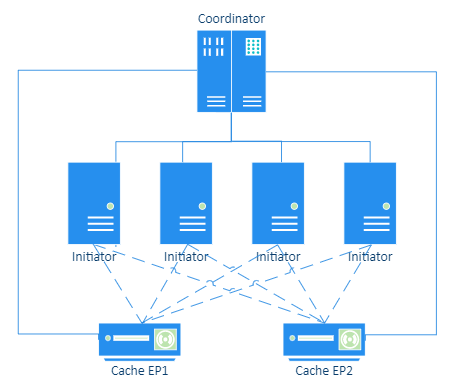
In this deployment, you have more than one Build Cache Endpoint that is used by more than one Client. The Clients define a default Endpoint, but you can override this in the build command to use a different Endpoint as well. This is ideal for CI environments that are running different builds. They can dynamically fetch the context of the build they are running and use the appropriate Endpoint.
Use Cases and Best Practices
Developer Machines - Working from home or in the office
For most machines, we recommend enabling both local and remote cache. This assumes that these machines are persistent (laptops, desktops, or persistent VMs), and that there are other machines (typically CI servers) that use only the remote cache and are writing to that cache. If no machines are writing exclusively using the shared cache, developer machines should only use local cache.
When you enable both local and remote cache on an agent, that agent can only contribute to the local cache.
When a build is run, the local cache is checked first. If there is a hit, the cache is used. Otherwise, Incredibuild checks the remote cache. If there is a hit, we use it and also update the local cache so that future executions will use the local cache and reduce network traffic. This is particularly useful when working from home due to the lower upload bandwidth. If there are no hits, the build is run and the information is added to the local cache.
CI Machines
CI builds can typically be considered a “source of truth”: they usually contain code that is trustworthy, stable, and is shared by other CI builds and developers. For the most part, code that is merged so that it is part of a CI build will change less often. As a result, its compiled artifacts (object files, etc.) are likely to be used by others, improving Build Cache efficiency and faster builds for everyone. When using machines for CI use cases, we recommend only using remote (shared) cache. The machines will then both read and write to the remote cache. This ensures that their content will be available even if the CI machine is torn down (as is done in many use cases). This also allows this cache to be shared with your developers working from home or in the office.
Remote (Shared) Cache Endpoints
For endpoints that host a remote cache, use the following recommendations to maximize performance:
-
Install Incredibuild on an Agent, but do not assign any licenses to the Agent so that it does not assist with or initiate any builds.
-
Do not run other programs on this machine, it should be a dedicated machine.
-
Add an Agent description to clearly identify the Agent as your remote cache.