Last updated on Dec 31, 2025 This feature is only available in Incredibuild’s Enterprise Plan. The Build Cache API enables API users to automatically carry out Build Cache actions with most of the capabilities of those done by the Build Cache Manager UI, including cluster and node actions such as start, stop, restart, clear cache, and log level adjustments. This API functions only if the user has an active API key feature on their license; rate limiting is aligned to the license API. The API endpoints support batch operations on multiple nodes and include mechanisms for retrieving cluster and node lists. These include Cluster level and specific Node actions. In addition, requests can be sent to multiple nodes simultaneously. Use of this API requires an API Key and an Enterprise license.

API Key and Syntax

Every API call must include a header with a valid key called client-api-key and the value of your API key. All APIs are case sensitive. Request Endpoint
Where:
  1. IB Coordinator IP Address/Hostname - The IP address or hostname of the Coordinator.
  2. Coordinator UI Port - The port number defined during installation. By default, this is 8000.
  3. clusters/nodes - Determines whether the action is on an entire cluster or is on a specific node.
  4. cluser/nodeName - The cluster or node name being queried / acted upon.
  5. action - stop, start, restart, clear
    1. stop service
    2. start service
    3. restart service
    4. clear cache
    5. LogLevel (Cluster only)
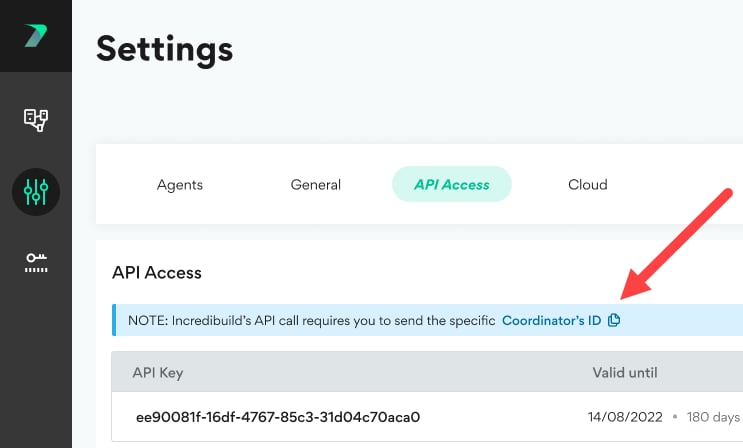
  6. Coordinator ID - The ID assigned by Incredibuild to your Coordinator. You can view this in the Coordinator Manager > Settings > API Access area.\
  7. Version - The version of the API. Currently only version 1.5.0 is supported. If you do not specify a version in the API call, the lowest supported version is used.
Header Every API call must include a header with a key called client-api-key and its value (case sensitive).

Support Matrix

Request Format

The request URL can contain any of the following fields.

POST Actions on Nodes

HTTP Method - PO

Example Request: Stop
Example Response Copy
Example Request: {start/restart/clear}
Example Response: Copy
Example Request: Clear cache on multiple nodes
Example Syntax: Copy
Example Body: Copy
Example Response: Copy
Example Request: Stop service on an empty node list
Copy
Example Request: Stop an invalid node
Example Response: Copy

POST Actions on Clusters

HTTP Method - POST

Example Request: Stop service on a cluster
Example Response: Copy
Example Request: {start or restart} service on a cluster, or clear its file cache. The action here is any of (start/restart/clear).
Example Response: Copy
Example Request: Invalid Action
Example Response: Copy
Example Request: Invalid cluster name
Example Response: Copy

Data Retrieval

Example Request: GET all Clusters
Example Response Copy
Example Request: GET all Nodes in a Cluster
Response Example Copy
Example Request: GET Invalid Cluster Name
Example Response Copy

Authentication & Licenses

Example Request: GET Clusters (you have a valid API key)
Response Example Copy
Example Request: GET Clusters (the required API key is not present)
Response Example Copy
Example Request: GET Clusters (you have an Invalid API key) Your license is invalid. In the Authorization section, under Auth Type, there is an API key, but it is invalid.
Response Example Copy
Example Request: GET Clusters. Your license does not have the required API access feature.
Response Example Copy

Permissions

Your API key must support your request in order to be successful. Sending an API request with an API key that does not support that request will result in an error response. Example: Error Response Copy

Log Level Management

The log level is used to provide more (or less) detail in your Incredibuild logs. API Log level actions can be done only on clusters. There are 5 log levels: Minimal, Basic (recommended), Intermediate, Extended, Detailed. Example Request: GET a cluster’s log level
Response Example: Copy
Example Request: Modify a cluster’s log level
Example Body: Copy
Response Example: Copy
Example Request: Attempt to modify a cluster log level to an invalid log level.
Send the PUT request, with a JSON document similar to the following example, as part of the request body. In this example, the requested level (“Invalid”) is not a valid value. Copy
Response Example: Copy

Response Status Codes

This API uses standard REST API status codes.