

- On the machine that will host the Agent, double-click Incredibuild Setup file. Incredibuild Setup wizard appears.
- Follow the Setup wizard instructions and click Next until you reach the Coordinator Selection page.
-
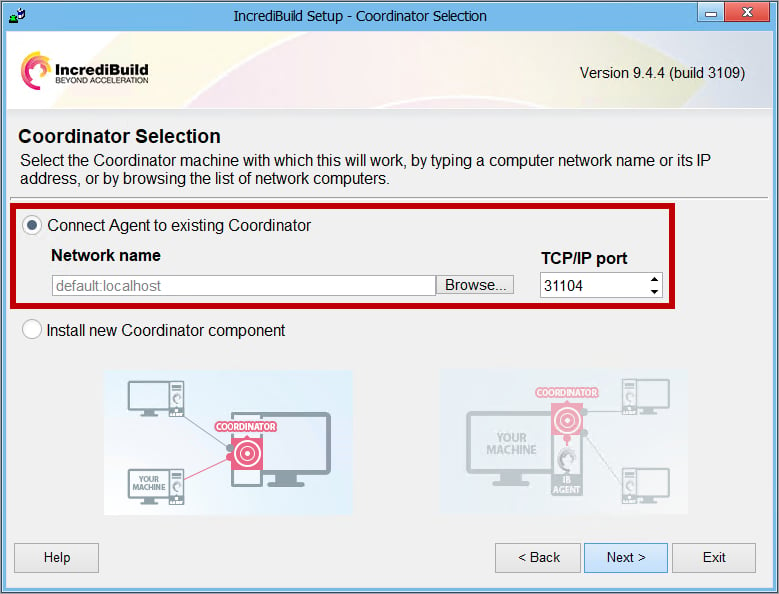
On the Coordinator Selection page, perform the following:
- Select the Connect Agent to existing Coordinator option.
-
In the Network name field, enter the IP address or hostname of the Coordinator. Then, click Next:
- Continue to follow the wizard instructions until the Install complete page, where you receive the following confirmation: The selected Incredibuild components have been successfully installed.Note: Once the connection to the Coordinator is established, the Coordinator automatically allocates available licenses to the installed Agent, according to the number of its cores.
- Exit the Setup wizard.A new Agent is now installed on a remote machine.
- Repeat this procedure for each new Agent you want to install on a remote machine.
Other
Installing Additional Agents
For the purpose of this trial procedure, we recommend that in addition to the Agent you installed along with the Coordinator, you should install 7 additional Agents on 7 other machines in your network, in order to fully explore the acceleration capability of Incredibuild.
To install an Agent: